
A fast visual primer. All images are compressed and cached for page speed.
API vs Axios for beginners: 17 Key Wins and Traps
By Morne de Heer, Published by Brand Nexus Studios
You want a simple answer to API vs Axios for beginners, without the noise. Here is the quick truth. Fetch API is built in and flexible. Axios adds polish and shortcuts that beginners love once apps grow.
In the first 100 lines of code, API vs Axios for beginners looks similar. But the small differences in errors, timeouts, interceptors, and transforms can save hours. This guide shows when to pick each, with clear examples and a decision tree.
Along the way, we will keep performance in mind. We will mention caching, response handling, and image compression so your pages feel snappy on mobile. Let us make API vs Axios for beginners a confident choice you can justify to your team.
Why API vs Axios for beginners matters
Beginners want to ship features fast. The wrong choice can create friction. With API vs Axios for beginners, you want the smallest learning curve with the biggest future payoff.
Fetch API is native in modern browsers and in Node 18 and newer. You call fetch, check res.ok, parse JSON, and move on. Axios is a library that gives you defaults, interceptors, and a tidy error object. Both send HTTP requests. The ergonomics differ.
Teams that learn API vs Axios for beginners early avoid dead ends later. They build a reusable HTTP layer, test it well, and keep code readable. That is the path to fewer bugs and smoother releases.

17 key wins and traps in API vs Axios for beginners
Start with outcomes. These wins and traps will guide your decision on API vs Axios for beginners without guesswork.
- Install cost – Fetch is built in. Axios adds a small dependency.
- JSON handling – Axios auto transforms JSON. Fetch needs res.json() each time.
- Error semantics – Fetch resolves on 404 or 500. Axios rejects non 2xx by default.
- Timeouts – Axios config has timeout. Fetch uses AbortController or custom races.
- Interceptors – Axios supports request and response interceptors for tokens and logs.
- Cancellation – Both support AbortController signals in modern versions.
- Progress events – Axios offers helpers, Fetch needs streams or XHR fallback.
- File uploads – Both handle FormData. Axios can simplify headers.
- Retries – Both need helpers; Axios has easy plugins or interceptors.
- TypeScript DX – Axios ships strong types. Fetch benefits from small wrappers.
- Response shape – Axios returns { data, status }. Fetch returns Response, then you parse.
- Node support – Node 18 has fetch. Axios works across older Node versions too.
- Bundle size – Fetch adds zero bytes. Axios adds a little but often worth it.
- Testability – Both mockable. Axios interceptors can simplify global stubs.
- Migration – You can wrap Fetch to mimic Axios patterns or swap Axios later.
- Learning curve – API vs Axios for beginners is easier when you start with Fetch basics.
- Team scale – Axios shines when many apps share a consistent HTTP client.
Keep this list handy. It summarizes API vs Axios for beginners in a way you can share with stakeholders.
Core differences with code you can copy
1. Basic GET requests
Let us compare the default experience in API vs Axios for beginners. First, a simple GET with Fetch.
// Fetch API
async function getPosts() {
  const res = await fetch('https://jsonplaceholder.typicode.com/posts');
  if (!res.ok) throw new Error('HTTP ' + res.status);
  return res.json();
}
Now the same with Axios.
// Axios
import axios from 'axios';

async function getPosts() {
  const { data } = await axios.get('https://jsonplaceholder.typicode.com/posts');
  return data;
}
2. POST requests and JSON
API vs Axios for beginners shows a small but important difference in body handling.
// Fetch API
async function createPost(post) {
  const res = await fetch('/api/posts', {
    method: 'POST',
    headers: { 'Content-Type': 'application/json' },
    body: JSON.stringify(post)
  });
  if (!res.ok) throw new Error('HTTP ' + res.status);
  return res.json();
}
// Axios
async function createPost(post) {
const { data } = await axios.post('/api/posts', post);
return data;
}3. Error handling
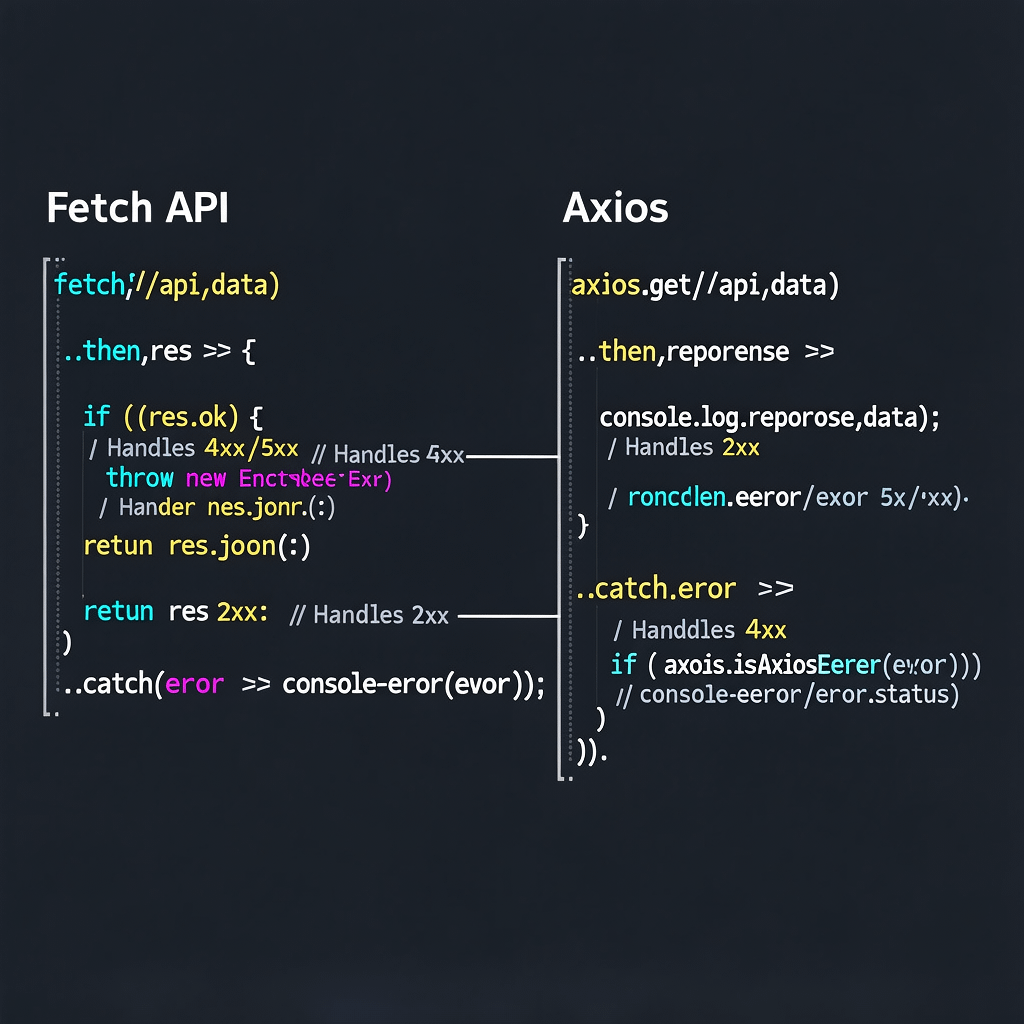
Here is where API vs Axios for beginners bites many devs. Fetch does not reject on HTTP errors. Axios does.
// Fetch API
async function safeFetch(url) {
  try {
    const res = await fetch(url);
    if (!res.ok) {
      return { ok: false, status: res.status, data: await res.text() };
    }
    return { ok: true, data: await res.json() };
  } catch (err) {
    return { ok: false, error: err.message || 'Network error' };
  }
}
// Axios
async function safeGet(url) {
try {
const res = await axios.get(url);
return { ok: true, data: res.data };
} catch (err) {
if (axios.isAxiosError(err)) {
return { ok: false, status: err.response?.status, data: err.response?.data };
}
return { ok: false, error: 'Network error' };
}
}
4. Timeouts and cancellations
In API vs Axios for beginners, timeouts and cancellations often decide the winner. Both can cancel with AbortController.
// Fetch timeout via AbortController
async function fetchWithTimeout(url, ms = 5000) {
  const controller = new AbortController();
  const id = setTimeout(() => controller.abort(), ms);
  try {
    const res = await fetch(url, { signal: controller.signal });
    if (!res.ok) throw new Error('HTTP ' + res.status);
    return res.json();
  } finally {
    clearTimeout(id);
  }
}
// Axios timeout and cancellation
async function axiosWithTimeout(url) {
const controller = new AbortController();
try {
const res = await axios.get(url, { timeout: 5000, signal: controller.signal });
return res.data;
} catch (e) {
throw e;
}
}5. Interceptors
If your stack needs auth headers or telemetry on every call, API vs Axios for beginners points to Axios. Interceptors make cross cutting concerns clean.
// Axios interceptors
const api = axios.create({ baseURL: '/api', timeout: 8000 });

api.interceptors.request.use(cfg => {
  const token = localStorage.getItem('token');
  if (token) cfg.headers.Authorization = 'Bearer ' + token;
  return cfg;
});

api.interceptors.response.use(
  res => res,
  err => {
    if (err.response?.status === 401) {
      // handle logout or refresh
    }
    return Promise.reject(err);
  }
);
6. Uploads, downloads, and progress
API vs Axios for beginners also covers UX. Progress indicators help perception of speed. Axios has helpful hooks. Fetch can do it with streams in modern environments.
// Axios upload progress
function upload(file) {
  const form = new FormData();
  form.append('file', file);
  return axios.post('/upload', form, {
    onUploadProgress: evt => {
      const pct = Math.round((evt.loaded * 100) / (evt.total || 1));
      console.log('Upload', pct + '%');
    }
  });
}
7. TypeScript typing
With TypeScript, API vs Axios for beginners is about DX. Axios responses can be generically typed. Fetch can be wrapped to return typed data.
// Axios with TypeScript
interface Post { id: number; title: string; }
const { data } = await axios.get<Post[]>('/api/posts');
// Fetch helper with TypeScript
async function getJSON<T>(url: string, init?: RequestInit): Promise<T> {
const res = await fetch(url, init);
if (!res.ok) throw new Error('HTTP ' + res.status);
return res.json() as Promise<T>;
}
const posts = await getJSON<Post[]>('/api/posts');8. Node, SSR, and older browsers
Node 18 ships fetch. For Node 16 or older, API vs Axios for beginners is simple. Use Axios or a ponyfill. For older browsers, consider polyfills, or bundle a small wrapper that hides transport details.
Quick start guide you can try now
If you want a fast path through API vs Axios for beginners, run these snippets. They focus on practical outcomes that help you choose confidently.
GET with Fetch and Axios
// Fetch GET
try {
  const res = await fetch('/api/profile');
  if (!res.ok) throw new Error('HTTP ' + res.status);
  const profile = await res.json();
  console.log(profile);
} catch (e) {
  console.error(e);
}

// Axios GET
try {
  const { data: profile } = await axios.get('/api/profile');
  console.log(profile);
} catch (e) {
  console.error(e);
}
POST with retries
// Fetch POST with naive retry
async function postWithRetry(url, body, tries = 2) {
  for (let i = 0; i < tries; i++) {
    try {
      const res = await fetch(url, {
        method: 'POST',
        headers: { 'Content-Type': 'application/json' },
        body: JSON.stringify(body)
      });
      if (!res.ok) throw new Error('HTTP ' + res.status);
      return res.json();
    } catch (e) {
      if (i === tries - 1) throw e;
    }
  }
}
// Axios POST with interceptor based retry
const client = axios.create();
client.interceptors.response.use(undefined, async error => {
const config = error.config;
if (!config.__retry) {
config.__retry = true;
return client(config);
}
return Promise.reject(error);
});Global configuration
API vs Axios for beginners often comes down to how much shared config you want. Axios makes a shared client trivial.
// Shared Axios client
export const http = axios.create({
  baseURL: '/api',
  timeout: 8000,
  headers: { 'X-App': 'demo' }
});
With Fetch, extract a small helper that adds headers, base URLs, and error checks.
// Shared Fetch helper
export async function httpFetch(path, init = {}) {
  const res = await fetch('/api' + path, {
    headers: { 'X-App': 'demo', ...(init.headers || {}) },
    ...init
  });
  if (!res.ok) throw new Error('HTTP ' + res.status);
  const ct = res.headers.get('content-type') || '';
  return ct.includes('application/json') ? res.json() : res.text();
}
Real world scenarios that decide the winner
Small site or prototype
In API vs Axios for beginners, a tiny site usually picks Fetch. It is already there and keeps bundles small. Add a 20 line helper and you are good to go.
React or Vue SPA
Once state, auth, and caching show up, Axios starts to shine. Interceptors centralize tokens and logging. The API vs Axios for beginners choice tilts toward Axios for consistency across teams.
File heavy apps
Uploads and progress bars often feel smoother with Axios. Fetch can do it but may need streams or XHR patterns. For beginners, Axios can reduce complexity.
Corporate proxies and legacy browsers
If you support old environments, Axios offers fewer surprises across Node versions and older browsers with polyfills. In API vs Axios for beginners, this is a practical reason to choose Axios.
SSR and Node services
With Node 18, Fetch works well in SSR. Axios remains a solid choice for older Node or when you want one HTTP client for server and browser code.
Strict TypeScript policies
Both options work. Many teams like Axios generics for responses. Others write a thin Fetch wrapper with typed helpers. API vs Axios for beginners can be settled by whichever makes your types simpler.
Monitoring and analytics
If your product team tracks API SLAs, Axios interceptors provide a clean place to measure latency and errors. Pair this with analytics and reporting to close the loop on real user outcomes.
Performance, bundle size, and caching
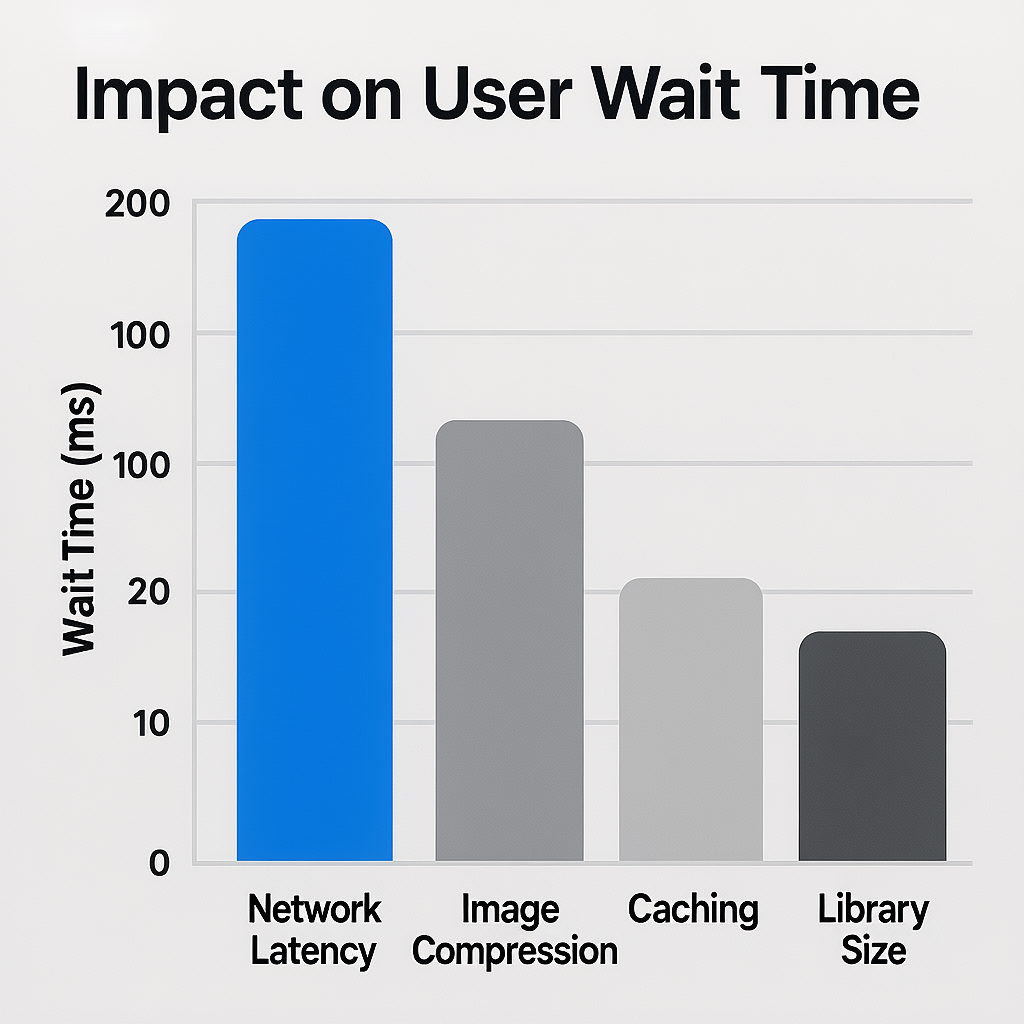
Performance is a team sport. In API vs Axios for beginners, bundle size is one factor. Most of the time, network latency dominates.
Fetch adds zero bytes because it is built in. Axios adds a small library, but the developer experience can reduce bugs and retries. The trade is usually worth it in medium apps.
For page speed, compress images, use HTTP caching, and avoid blocking scripts. When you combine smart data fetching with image compression and CDN caching, Core Web Vitals improve.
If you want an expert to bake performance into your build, the SEO services team at Brand Nexus Studios aligns technical choices with organic growth.
Security, CORS, and headers
Security policy will not change much in API vs Axios for beginners, but ergonomics matter. Both support credentials, custom headers, and cookies within policy constraints.
CORS is a server side setting. Your choice of Fetch or Axios does not bypass CORS. Beginners should test with proper dev servers and configure allowed origins.
Store tokens securely and avoid long lived secrets in localStorage. Interceptors can attach short lived tokens. For Fetch, centralize header logic in a helper to avoid repetition.
A practical decision guide
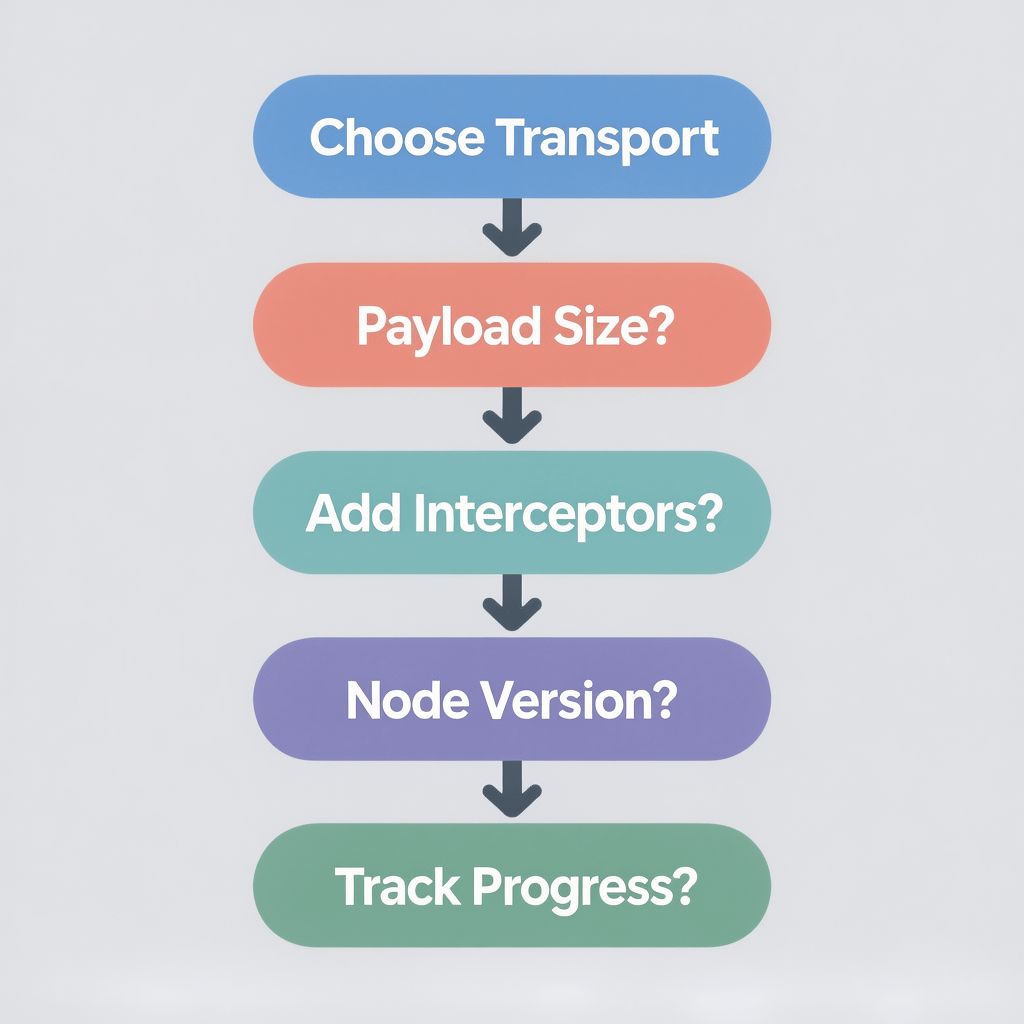
Use this checklist to settle API vs Axios for beginners in minutes.
- If you want the smallest footprint and modern browsers, start with Fetch.
- If you need interceptors for auth or telemetry, choose Axios.
- If you support Node older than 18, prefer Axios or add a fetch ponyfill.
- If you need progress events today, Axios is easier.
- If your team shares one HTTP client across apps, Axios scales well.
- If you want to teach fundamentals first, begin with Fetch, then upgrade.
When your roadmap includes complex flows, the decision leans toward Axios. For simple pages and small scripts, Fetch remains a perfect fit.
Set up patterns that scale
API vs Axios for beginners is easier when you wrap the raw transport. A tiny client module gives you a single place for headers, base URLs, and error mapping.
// src/http/client.ts - choose one transport under the hood
type Transport = (path: string, init?: RequestInit) => Promise<unknown>;

export function createClient(baseURL = '/api'): Transport {
  return async (path, init = {}) => {
    const res = await fetch(baseURL + path, init);
    if (!res.ok) throw new Error('HTTP ' + res.status);
    const ct = res.headers.get('content-type') || '';
    return ct.includes('json') ? res.json() : res.text();
  };
}
// src/http/axios-client.ts - Axios variant
import axios from 'axios';
export const axiosClient = axios.create({
baseURL: '/api',
timeout: 10000
});
axiosClient.interceptors.response.use(
res => res,
err => {
// map errors here
return Promise.reject(err);
}
);This separation lets you switch between Fetch and Axios without touching feature code. It makes API vs Axios for beginners a reversible decision rather than a bet you cannot change.
If you want help designing a clean API layer that supports growth, website design and development by Brand Nexus Studios bakes maintainability into every build.
Testing your HTTP code like a pro
Good tests make API vs Axios for beginners lower risk. Focus on behavior, not implementation details.
// Fetch with jest
import { httpFetch } from './httpFetch';

test('returns JSON on 200', async () => {
  global.fetch = jest.fn().mockResolvedValue({
    ok: true,
    json: async () => ({ ok: true }),
    headers: new Map([['content-type', 'application/json']])
  });
  const data = await httpFetch('/ping');
  expect(data).toEqual({ ok: true });
});
// Axios with jest
import { http } from './http';
import axios from 'axios';
jest.mock('axios');
const mocked = axios as jest.Mocked<typeof axios>;
test('rejects with status on 500', async () => {
mocked.get.mockRejectedValue({ response: { status: 500 } });
await expect(http.get('/oops')).rejects.toBeTruthy();
});In CI, run tests on every push and cache dependencies. Keep images compressed and use caching headers in production so your pages remain fast even as the suite grows.
Common mistakes and quick fixes
- Ignoring res.ok with Fetch – Always check it and throw or handle errors.
- Not parsing JSON safely – Guard with content type checks to avoid runtime errors.
- Forgetting timeouts – Use AbortController for Fetch or timeout in Axios.
- Scattering headers everywhere – Centralize in a client wrapper for API vs Axios for beginners.
- Leaking tokens – Store short lived tokens and refresh securely.
- Unstable retries – Add backoff and a cap to avoid hammering APIs.
- No logging – Add interceptor logs in Axios or wrapper logs in Fetch.
- Not canceling stale requests – Cancel on route change or component unmount.
- Overusing global interceptors – Keep them focused and test them well.
- Skipping performance basics – Use image compression and caching first.
Fix these and API vs Axios for beginners becomes a smooth path rather than a constant headache.
Beginner friendly checklist
- Pick Fetch for smallest apps, Axios for shared configuration.
- Wrap your transport with a tiny client to keep code clean.
- Parse JSON deliberately and handle non 2xx responses.
- Set timeouts and use AbortController consistently.
- Log requests and responses in development only.
- Use retries with backoff for flaky endpoints.
- Cancel requests on route changes to save bandwidth.
- Compress images and enable caching to protect Core Web Vitals.
- Test your client code with Jest or Vitest before shipping.
- Document your client so beginners know how to use it.
If you want strategy and execution in one place, Brand Nexus Studios can integrate the right HTTP approach into your build while your team stays focused on features.
FAQs on API vs Axios for beginners
What is the main difference in API vs Axios for beginners?
Fetch is built in and minimal, while Axios adds features like interceptors, request timeouts, and rich errors. Beginners can start with Fetch, then add Axios when needed.
Is Axios faster than the Fetch API?
They are similar for most workloads. Network time dominates. Axios can feel faster because it removes boilerplate and improves readability.
Do I need Axios if I already know Fetch?
No. For small apps, Fetch is perfect. Choose Axios when you want shared config, interceptors, or better default errors.
How do errors differ in API vs Axios for beginners?
Fetch resolves for HTTP errors and needs a res.ok check. Axios rejects non 2xx and includes response details on the error object.
Which is better for TypeScript?
Both are fine. Axios has mature types. Fetch works well with a tiny typed helper.
Can I cancel requests with both?
Yes. Use AbortController for both Fetch and Axios in modern setups.
Does API choice affect SEO or Core Web Vitals?
Indirectly. Fewer errors and smaller bundles help. Always pair with compression and caching for best results.
References
About the Author