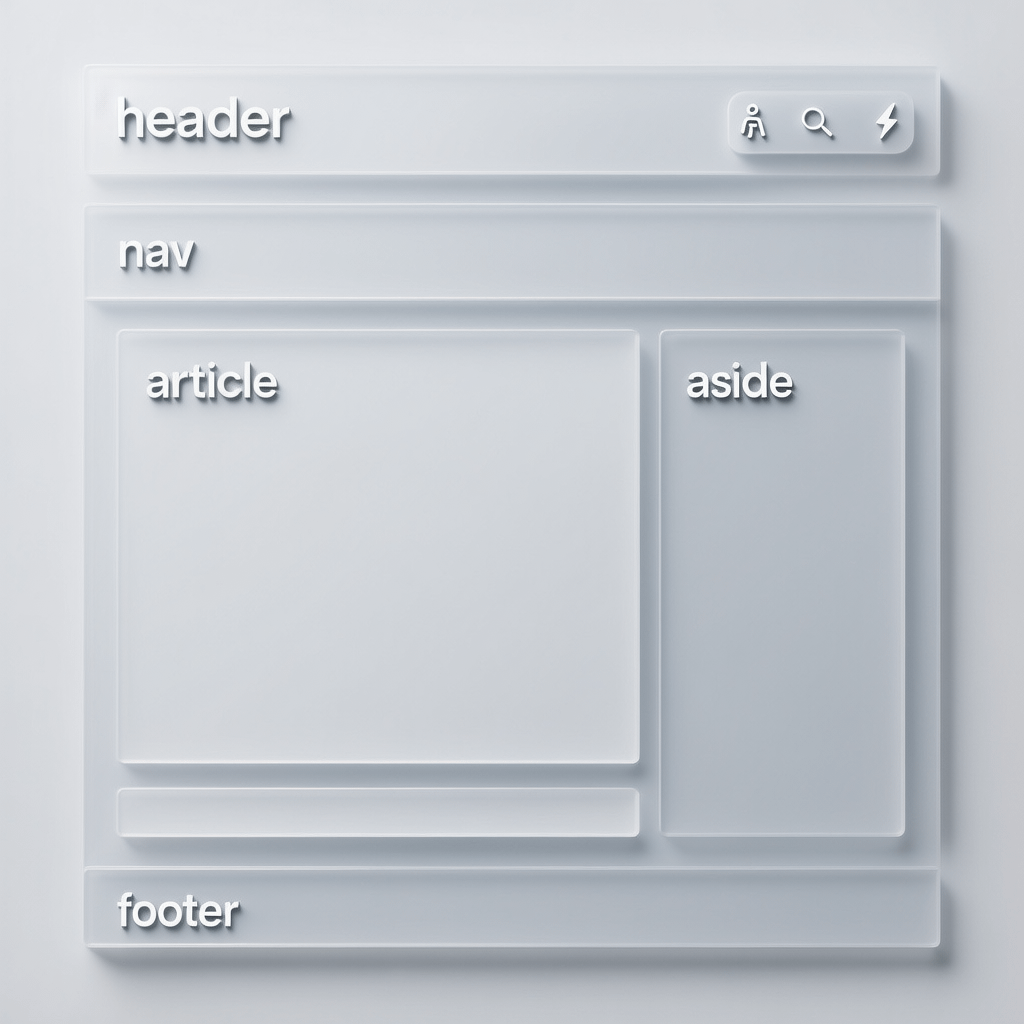
A clean, semantic layout guides users, search engines, and assistive tech.
Semantic HTML Elements: 21 Powerful Wins for UX
By Morne de Heer, Published by Brand Nexus Studios
Semantic HTML elements are the fastest way to upgrade your site without changing a pixel of your design. When you label structure clearly, everything from screen readers to search bots understands your pages better.
Right from the first line of a project, semantic HTML elements set expectations for content and behavior. They tell browsers how to parse, tell crawlers where the main content lives, and tell teams how to extend features without chaos.
In this guide, we unpack 21 wins you can claim with semantic HTML elements, share practical patterns you can ship today, and give you a simple audit to level up any page. Let’s turn div soup into clarity you can measure.
What are semantic HTML elements?
Semantic HTML elements are native tags that describe meaning, not presentation. Think header, nav, main, article, section, aside, and footer. Add figure and figcaption for media, time for dates, and address for contact info.
Developers often default to divs and spans. Replace those with semantic HTML elements and you improve readability for humans and machines. You also create reliable landmarks for keyboard navigation and screen readers.
Search engines prefer pages that use semantic HTML elements consistently. Clear structure increases the chance of enhanced snippets, sitelinks, and better indexation. It also reduces the need for brittle ARIA patches.
21 wins unlocked by semantic HTML elements
Grab these practical wins. Most take minutes to apply, yet they compound into big UX and SEO gains.
- Faster comprehension for users who scan pages, thanks to semantic HTML elements and a logical heading tree.
- Cleaner navigation via landmarks, with semantic HTML elements like nav and main creating predictable regions.
- Better snippet generation in search, since semantic HTML elements highlight key content blocks.
- Improved accessibility with labels and roles provided by semantic HTML elements out of the box.
- Lower DOM complexity when semantic HTML elements replace extra wrappers and redundant divs.
- More consistent styling hooks because semantic HTML elements carry meaning you can select on.
- Reduced JS glue code when semantic HTML elements already expose expected behavior.
- Stable layouts because semantic HTML elements map to known display roles in CSS.
- Reliable analytics zones by tracking interactions inside semantic HTML elements like article and aside.
- Easier content migrations when CMS blocks map to semantic HTML elements naturally.
- Cleaner keyboard navigation since semantic HTML elements form a sensible tab order.
- Better screen reader outlines thanks to semantic HTML elements and correct headings.
- Higher maintainability as new teammates read semantic HTML elements like a table of contents.
- Fewer ARIA overrides by relying on native semantics first.
- Improved internal linking structure organized within semantic HTML elements.
- More accurate canonical sections for crawlers with a single main region.
- Smoother theming because semantic HTML elements are obvious CSS targets.
- Less code churn as semantic HTML elements survive redesigns without renaming.
- Clearer component boundaries where article cards and lists use semantic HTML elements.
- Better Core Web Vitals due to leaner HTML and optimizable images.
- Straightforward audits using a checklist of semantic HTML elements.
Semantic layout in practice
Start with landmarks. Use header for the top, nav for primary or section navigation, main for primary content, and footer for closing information. Wrap posts or product cards with article. Group related parts with section when you need a heading.
For media, pair figure with figcaption. For dates, use time with a machine readable datetime attribute. For contact details, address adds context. These semantic HTML elements make your content purpose crystal clear.

Keep one main per page. Add multiple article elements if you list posts. Use section to divide an article into H2 based parts. Avoid wrapping everything in meaningless containers when semantic HTML elements exist for the job.
On blog pages, the H1 names the page. Each post preview can be an article with its own H2. In the single post view, the article holds the full content. This consistent use of semantic HTML elements helps every tool that touches your site.
Accessibility built on semantic HTML elements
Great accessibility starts with native semantics. Screen readers announce landmarks created by semantic HTML elements. Users can jump from nav to main to footer in seconds. That convenience drives retention and trust.
Headings matter. Use one H1 per page, then H2 and H3. Inside those sections, semantic HTML elements like list and table provide additional structure. Label form fields with label, and group them using fieldset and legend.

Prefer native controls and semantics. If you build custom widgets, add ARIA with restraint. Semantic HTML elements do most of the heavy lifting, and they age better than bespoke scripts.
Test your pages with a screen reader and keyboard only. If focus order follows your semantic HTML elements naturally, you are on the right path. Fix any detours by aligning DOM order with visible order.
SEO signals improved by semantic HTML elements
Search engines read your pages like a fast skimmer. Semantic HTML elements act as signposts. They show where main content begins and where supporting content ends. That clarity increases the chance of rich snippets and accurate sitelinks.
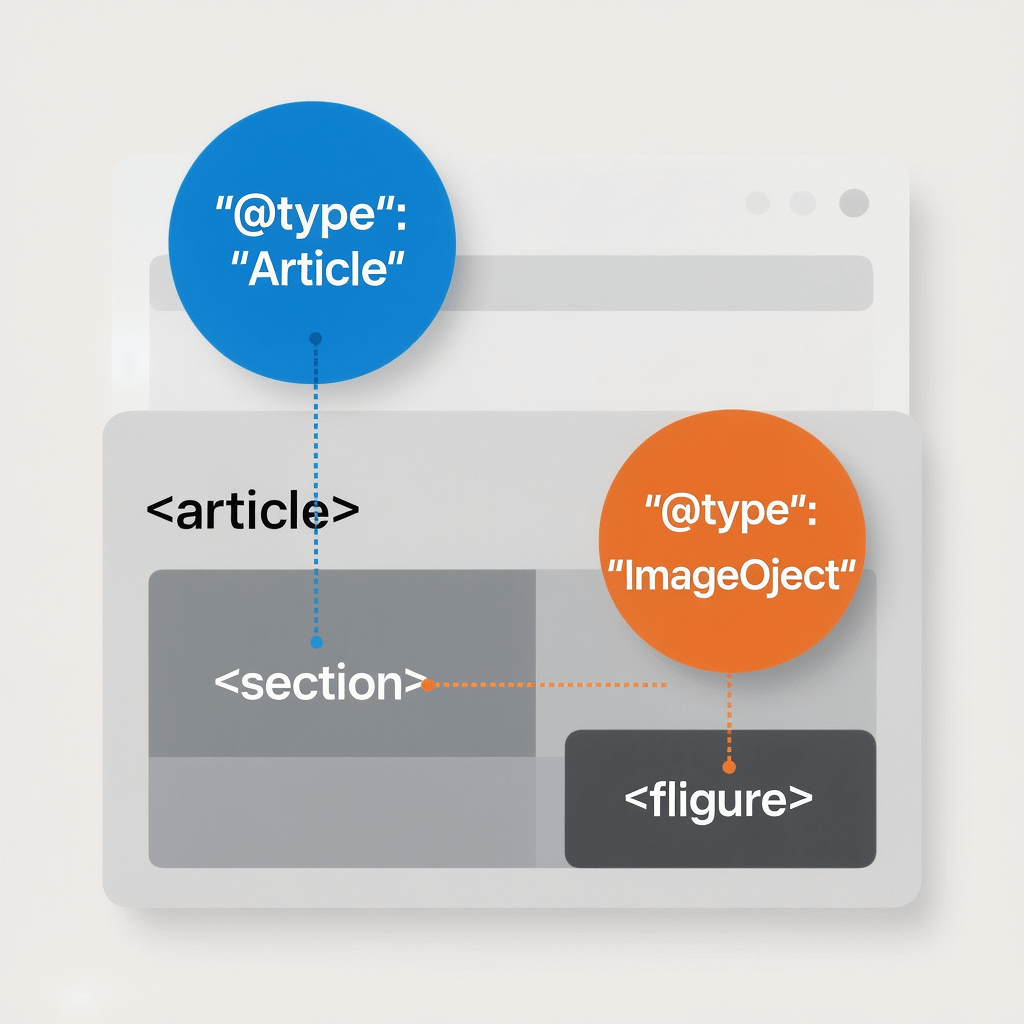
Pair good structure with structured data. JSON LD adds meaning at the data layer, while semantic HTML elements shape the content layer. Together, they help search understand and reward your work.
Use internal links inside meaningful contexts. Link related topics from within article sections, not footers or boilerplate. Search interprets links inside semantic HTML elements with more confidence than links in cluttered regions.
If SEO is a priority, align your site structure with SEO services that respect semantics. Strategy sticks when content, HTML, and data tell the same story.
Performance and Core Web Vitals
Lean markup is fast markup. Replacing wrappers with semantic HTML elements reduces DOM depth. Fewer nodes means less layout work, which can help CLS and LCP. Every kilobyte you remove shrinks time to render.
Compress all images, set proper dimensions, and enable caching. Use modern formats like WebP where possible, and lazy load non critical images. Mentioning it again because it matters. Images in this post are compressed and cache friendly.
Semantic HTML elements reduce reliance on JavaScript for simple behaviors. Less JS improves FID and INP. Pair semantics with a performance budget to keep pages light as you scale.
If your theme feels heavy, consider a refactor alongside website design and development best practices that center on native semantics.
Semantic HTML elements for common components
Navigation
Wrap the primary menu in nav. If you have sub navigation inside sections, use additional nav elements scoped to those areas. Keep link text descriptive.
Header and hero areas
Reserve header for the top region of the page or for a section. Avoid stacking multiple decorative headers at the same level. Semantic HTML elements keep the hierarchy predictable.
Articles and cards
Use article for independent content units. Blog cards, product tiles, and press releases are ideal candidates. Within each, semantic HTML elements like h2, figure, and time paint a complete picture.
Sidebars and related content
Aside signals tangential content. It is perfect for related links, author bios, or promo modules. By isolating extras, semantic HTML elements keep main content focused.
Footer
Place contact info inside address and wrap legal links in a list. The footer is a trustworthy place for utilities. Semantic HTML elements guide crawlers to treat it as supportive, not primary.
Forms
Always pair inputs with label, group related inputs in fieldset, and describe groups with legend. These semantic HTML elements boost completion rates by removing guessing.
Headings that scale
A consistent heading hierarchy makes scanning effortless. Start with one H1, then H2 for major sections, with H3 for nested parts. Keep levels consecutive. Semantic HTML elements alone cannot fix a broken heading ladder.
Use headings to summarize content. Assistive tech builds an outline from headings. When you align headings and semantic HTML elements, navigation becomes obvious for every user.
Tables, lists, and media
Tables need thead, tbody, th, and scope so relationships are announced correctly. Lists should use ul, ol, and li instead of ad hoc divs. Media belongs in figure with figcaption. These semantic HTML elements turn raw content into structured knowledge.
Do not rely on visual styling to imply structure. If something is a list, mark it as a list. If something is data, tag it as a table. Semantic HTML elements are the ground truth that styles can build on.
Structured data and semantic HTML elements
Structured data shines when the underlying HTML is solid. JSON LD should reflect the reality described by semantic HTML elements. Keep the two in sync to avoid confusing search engines.
For articles, mark up author, headline, datePublished, and image. For products, add offers and reviews. Map fields to the elements you already use. Semantic HTML elements make this mapping straightforward.
WordPress tips for semantics
Modern block themes output many semantic HTML elements by default. Still, verify each template. Ensure there is a single main, proper heading levels, and meaningful article wrappers for posts.
Use block patterns that encourage structure. When you add images, include alt text and captions. Compress every upload and enable page caching. These basics complement your semantic HTML elements for a fast, accessible site.
If you want a partner who sweats the details, Brand Nexus Studios builds, hosts, and maintains sites with semantics and performance at the core.
Analytics that respect structure
Measure what matters. Track events inside article sections, not just on generic buttons. When you anchor analytics to semantic HTML elements, you get cleaner funnels and clearer insights.
Segment reports by landmark to see where attention flows. Use scroll depth inside main and click tracking inside nav. Pair this with robust analytics and reporting so your metrics mirror your content architecture.
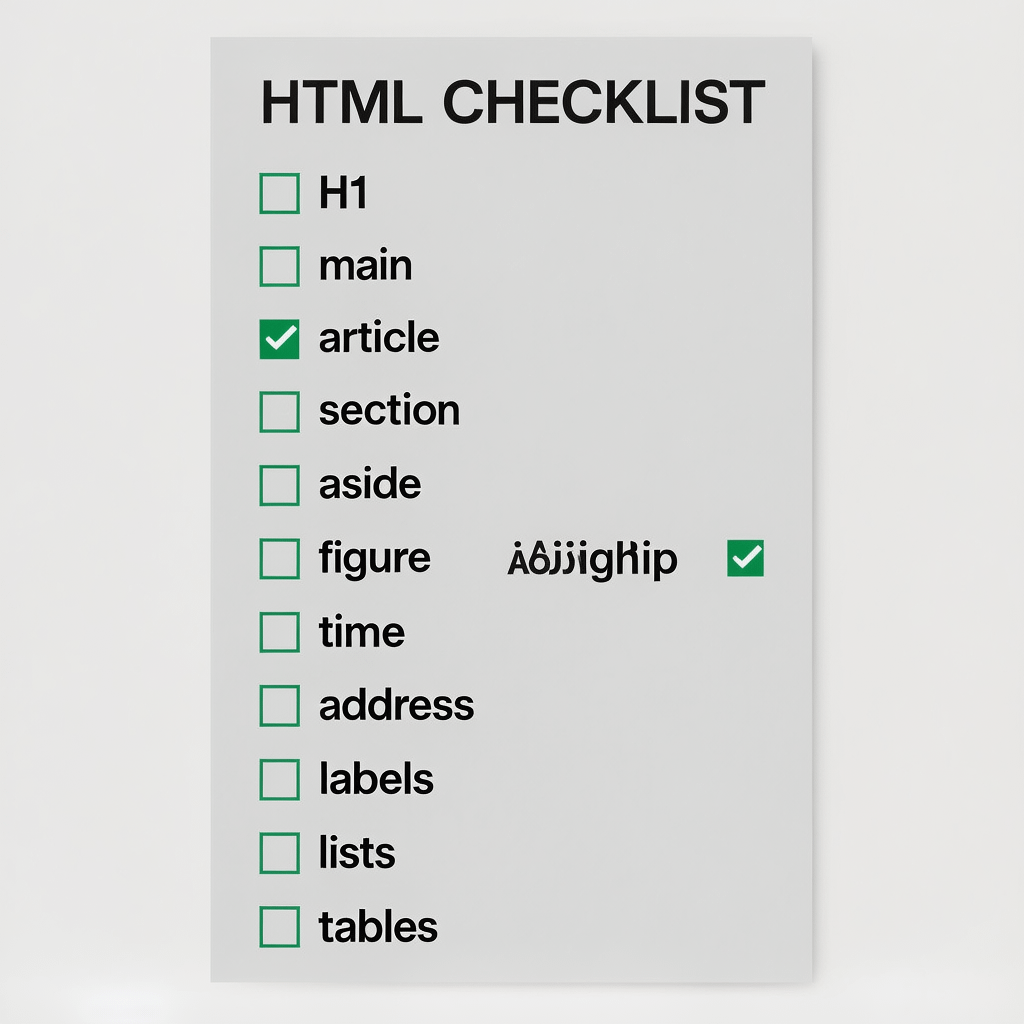
Audit checklist for semantic HTML elements
- One H1 that matches the page topic and supports semantic HTML elements used below it.
- One main landmark that wraps primary content.
- Header and nav used appropriately with descriptive link text.
- Article used for standalone content units, with H2 inside.
- Section used sparingly and always with a heading.
- Aside reserved for tangential content, not core content.
- Figure and figcaption paired for media.
- Time used for dates with datetime attributes.
- Address used for contact or business details.
- Forms labeled with label, fieldset, and legend.
- Lists marked with ul or ol instead of styled divs.
- Tables structured with thead, th, scope, and captions where needed.
- Images compressed, sized correctly, and lazy loaded.
- Site wide caching enabled and tested.
- Heading levels are consecutive and logical.
- No multiple main elements or empty headings.
Common mistakes to avoid
Div soup makes everything harder. Replace generic wrappers with semantic HTML elements that declare intent. Your future self will thank you.
Do not skip heading levels. A jump from H2 to H4 confuses assistive tech. Keep the ladder clean. Semantic HTML elements amplify a good outline and expose a messy one.
Avoid multiple mains or placing main inside unrelated containers. Landmarks should be top level. Use aside for tangents, not for critical content that belongs under main.
Do not add ARIA roles that contradict native behavior. Use role only when you create a fully custom interactive component. Semantic HTML elements already carry rich roles that work reliably.
Never rely on color or styling alone to convey meaning. Semantics must exist in the HTML. Then styling may enhance, but it must not replace, the roles of semantic HTML elements.
Case study style walkthrough
Imagine a blog homepage with 60 nested divs and no landmarks. A quick pass replaces wrappers with header, nav, main, and footer. Post cards become article elements with H2 titles and time for dates.
Next, we add figure and figcaption to images, move related links into aside, and fix headings. With these semantic HTML elements in place, the outline becomes scannable and the DOM shrinks.
Results within two weeks: faster perceived load, improved Lighthouse accessibility scores, and higher click through from search because snippets made more sense. The team ships content faster because patterns are obvious.
Multiply this by every template and the effect compounds. Semantics are foundation work. They are invisible to the casual eye, yet they support every feature stacked above them.
How to roll out semantic HTML elements across a site
Inventory templates
List every unique layout. For each, sketch the intended landmarks and headings. This creates a contract your team can follow consistently.
Refactor gradually
Start with header, nav, main, and footer. Then move to article, section, and aside. Finally, replace media, tables, and forms with semantic HTML elements that match their roles.
Codify rules
Add linting rules and PR checklists. Include examples of semantic HTML elements in your component library so designers and developers make the same choices.
Test and measure
Run Lighthouse, axe, and manual keyboard tests. Track bounce rate, scroll depth, and conversions. Semantics plus measurement gives you a feedback loop.
If you need expert hands to lead a rollout, Brand Nexus Studios offers end to end support from strategy to build to hosting and maintenance with a semantic first approach.
Copy, content, and semantic HTML elements
Words and structure should reinforce each other. Write headings that summarize sections. Pair them with semantic HTML elements so scanners catch your message in seconds.
For long pages, break topics into digestible sections. Use lists where appropriate. When your copy lines up with semantic HTML elements, engagement improves without tricks or hacks.
Content also benefits from clean internal linking. Add links where they help the reader, inside relevant article sections. Search understands links better when they live inside meaningful contexts defined by semantic HTML elements.
Governance and training
Document your standards. Provide examples of good markup patterns and explain why they matter. When teams understand semantic HTML elements, fewer regressions slip into production.
Offer quick code reviews focused on semantics. A 5 minute pass saves hours later. Build shared snippets that bake in semantic HTML elements by default, so developers do not have to reinvent them.
Design systems meet semantic HTML elements
Components should expose semantics, not hide them. In a design system, card, list, and table primitives map directly to semantic HTML elements. This keeps accessibility strong as you scale.
When tokens and components align with semantics, designers can reason about structure while they consider aesthetics. Velocity increases, and quality improves in parallel.
Frameworks without losing semantics
Utility frameworks like Tailwind or Bootstrap can be fully semantic. It is not the framework that causes div soup, it is careless markup. Wrap utilities around semantic HTML elements, not the other way around.
If you build React or Vue components, render native elements with correct props. Use role only when no native element fits. Keep semantic HTML elements at the heart of your JSX or templates.
Testing and QA routines
Add automated checks for landmark count and heading order. Include aXe in CI. Catch missing labels on forms. These checks enforce your use of semantic HTML elements at scale.
Pair automation with human testing. Ask people to navigate by keyboard only. If they can reach major sections and understand the outline, your semantic HTML elements are working.
Content velocity through clarity
Editors move faster when templates are predictable. With semantic HTML elements, a content team knows exactly where to put media, pull quotes, and CTAs. That confidence speeds production.
Developers benefit too. Smaller components with clear responsibilities are easier to test. Semantics creates seams in your codebase that match how people think about content.
Govern your media and performance
Media belongs inside figure with instructive figcaptions. Add explicit width and height attributes or CSS to prevent layout shifts. Semantic HTML elements help reserve space and reduce CLS.
Compress images before upload, serve multiple sizes, and configure caching on your host. When semantics meet smart performance tactics, pages feel instant. Readers stay longer and convert more.
From semantics to conversions
Better structure makes reading effortless. Effortless reading makes decisions easier. That lifts conversions. The smallest nudge can be a logical section that introduces a CTA at the right time.
Tie conversion tracking to meaningful parts of the page. Attribute success to the semantic HTML elements that house your offers. You will learn which sections persuade and which need refinement.
Recap: the habit of clean structure
Semantics are not a one time task. They are a habit. Keep replacing generic wrappers with semantic HTML elements. Keep your headings honest. Keep your media labeled and your forms accessible.
Do this, and your site gets easier to maintain, easier to scale, and easier to find. It is the foundation that supports great design, great content, and great outcomes.
FAQs about semantic HTML elements
What are semantic HTML elements and why do they matter?
They are meaningful tags like header, nav, main, article, section, and footer. Semantic HTML elements improve accessibility, SEO, maintainability, and teamwork. They make intent obvious to users, crawlers, and contributors.
Do semantic HTML elements help SEO directly?
They help search engines parse structure and identify key content. While not a magic ranking button, semantic HTML elements often lead to better snippets, sitelinks, and engagement that supports rankings.
How many H1 tags should a page have?
Use one. Then ladder down H2 and H3 inside logical sections. This creates a clear outline supported by semantic HTML elements.
Is ARIA still needed if I use semantic HTML elements?
Prefer native semantics first. Add ARIA only for custom widgets that lack a native element. Overriding native semantics can harm accessibility.
What is the difference between section and article?
Article is self contained content that could stand alone. Section groups related parts inside a page or article. Both are semantic HTML elements with different scopes.
How do semantics affect Core Web Vitals?
Better structure can reduce DOM bloat, improving layout stability and perceived performance. Combine semantic HTML elements with image compression and caching for best results.
References
About the Author