
Your optimize website load time checklist in action. All images on this page are compressed for speed.
Optimize Website Load Time Checklist: 37 Powerful Fixes
By Morne de Heer, Published by Brand Nexus Studios
Slow pages cost attention, revenue, and trust. This optimize website load time checklist gives you a battle tested path to faster rendering, better Core Web Vitals, and higher conversions without guesswork.
Use the optimize website load time checklist as a repeatable workflow. Start with measurement, knock out quick wins, then go deeper with code, images, and caching. You will see real world gains when you stack these steps.
If you want expert help implementing this optimize website load time checklist at scale, the performance focused team at website design and development can streamline your stack and ship faster pages.
Why Speed Wins Before Design
Fast pages get crawled more, indexed better, and clicked more often. The optimize website load time checklist prioritizes first render and interactivity, so users can see and use your content quickly.
Search engines reward responsiveness and stability. When you follow the optimize website load time checklist, you improve LCP, CLS, and INP, which supports SEO and boosts engagement.
How To Use This Optimize Website Load Time Checklist
Start with a baseline. Test a key landing page, a blog post, a category page, and a checkout or form. Record results before changes. The optimize website load time checklist works best when you track deltas.
Work in layers. Apply server and CDN wins first, then front end rendering fixes, then media optimization. The optimize website load time checklist saves time by sequencing high impact actions early.
Validate your changes. Rerun tests, confirm Core Web Vitals in field data, and watch critical business metrics. The optimize website load time checklist only matters if it moves KPIs.
Core Principles That Drive Results
- Prioritize above the fold content and user input readiness.
- Ship fewer bytes with smarter caching and compression.
- Defer what can wait, inline what must render immediately.
- Move content closer to users with a CDN and edge caching.
- Automate the optimize website load time checklist in CI so perf does not regress.
Reduce Server Response Time and TTFB
Faster backends make every other step easier. The optimize website load time checklist starts with server response because it sets the ceiling for speed.
Pick the right hosting tier
Use modern PHP versions, HTTP 2 or HTTP 3, and adequate CPU and RAM. The optimize website load time checklist flags underprovisioned servers as a top risk.
Enable full page and object caching
Serve cached HTML for anonymous users and cache database queries. The optimize website load time checklist often cuts TTFB in half with cache rules alone.
Add a global CDN
Distribute static assets and consider CDN HTML caching for content heavy pages. The optimize website load time checklist encourages edge rules that respect cookies and vary headers safely.
Need hands on optimization across hosting and code? Our advanced SEO services align technical speed fixes with ranking growth so the optimize website load time checklist translates into traffic.
Eliminate Render Blocking Resources
Critical CSS belongs inline for the above the fold. Non critical CSS should load with media attributes or be split. The optimize website load time checklist favors first render over theoretical elegance.
Defer and async JavaScript
Mark non essential scripts async or defer. Load heavy widgets on interaction. The optimize website load time checklist removes boot time penalties that users never asked for.
Resource hints
Use preload, preconnect, and dns prefetch strategically. The optimize website load time checklist reserves these for the few assets that unblock rendering or fonts.
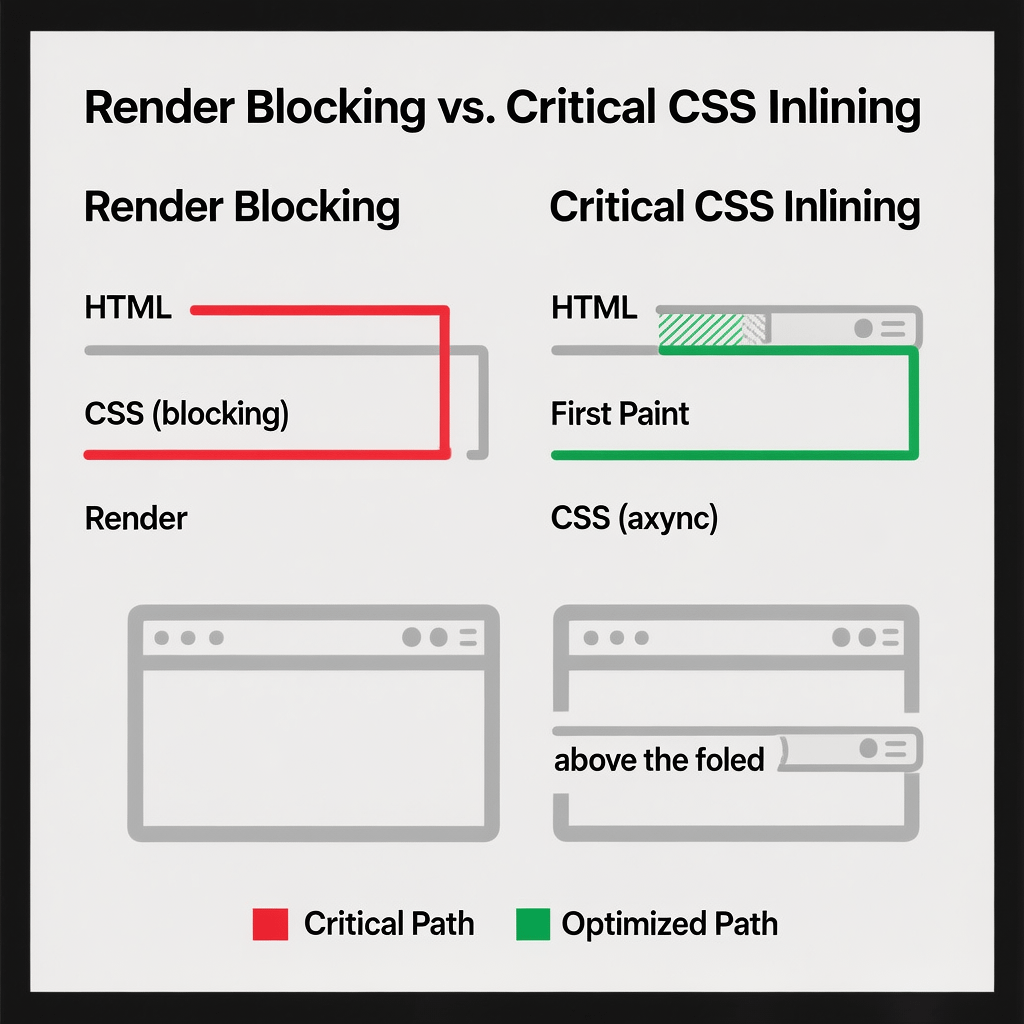
Image Optimization That Protects Quality
Images drive conversions, but they also dominate payload size. The optimize website load time checklist compresses aggressively while keeping detail where the eye notices.
Modern formats
Prefer WebP and AVIF and provide a safe JPEG or PNG fallback as needed. The optimize website load time checklist balances compatibility with weight reduction.
Right size every image
Serve images sized to the container with srcset. The optimize website load time checklist avoids shipping 2000 px images into 400 px slots.
Lazy load below the fold
Use native loading attributes and threshold tuning. Exclude hero media. The optimize website load time checklist protects LCP while delaying non essential downloads.

Font Loading Without Jank
Fonts can block rendering and pop in late. The optimize website load time checklist sets font display swap, subsetting, and preconnect for font hosts.
Subset and variable fonts
Ship only needed glyph ranges and consider variable fonts. The optimize website load time checklist trims font weight and style overhead.
System fallback
Use a good fallback stack for instant paint. The optimize website load time checklist keeps the first paint readable even before custom fonts load.
Third Party Scripts Under Control
Trackers, chats, and widgets add up. The optimize website load time checklist audits every third party and keeps only what pays its way.
Load on interaction
Defer chat, reviews, and maps until a click. The optimize website load time checklist limits idle CPU and main thread blocking at startup.
Tag management
Consolidate tags and remove duplicates. The optimize website load time checklist uses a governance policy, so scripts do not sneak back in.
Mobile First Rendering
Most users arrive on mobile. The optimize website load time checklist targets slow networks with lean markup, prioritized content, and careful JavaScript delivery.
Minimize main thread work
Avoid heavy hydration and keep interaction quick. The optimize website load time checklist uses code splitting and islands where helpful.
Respect data plans
Detect save data and adapt. The optimize website load time checklist can swap high cost components for lighter variants or static content.
Monitoring That Does Not Lie
Lab tests are great for debugging, but field data is the truth. The optimize website load time checklist pairs synthetic tests with real user monitoring so you see what customers feel.
Set alerts on regression thresholds. The optimize website load time checklist catches issues right after a deploy, not weeks later.
To connect speed to outcomes, wire performance into analytics. Our analytics and reporting approach turns the optimize website load time checklist into measurable ROI.

Caching Rules That Stick
Long lived caches with cache busting give you the best of both worlds. The optimize website load time checklist recommends far future TTLs on assets with versioned filenames.
HTTP caching headers
Use Cache Control, ETag, and immutable where appropriate. The optimize website load time checklist sets standards for all asset types.
Service workers
Cache static shells and offline assets carefully. The optimize website load time checklist updates workers predictably to avoid stale content.
Database and Backend Efficiency
Slow queries delay everything. The optimize website load time checklist includes indexing, query optimization, and read write splitting for scale.
Trim payloads
Return only the fields you render. The optimize website load time checklist removes data bloat at the source so the frontend can fly.
Queue background work
Defer image processing and reports to workers. The optimize website load time checklist keeps requests light and predictable.
Security That Speeds Things Up
TLS 1.3 and HTTP 3 reduce handshake costs. The optimize website load time checklist treats security as a performance ally, not a tax.
HSTS and OCSP stapling
Set strong policies and reduce round trips. The optimize website load time checklist leans on modern protocols for faster first bytes.
WordPress Specific Wins
WordPress can be fast. The optimize website load time checklist focuses on themes, plugins, and media storage that keep things lean.
Plugin hygiene
Audit plugins and remove overlaps. The optimize website load time checklist avoids multiple page builders or image optimizers fighting each other.
Persistent object cache
Use Redis or Memcached for database backed sites. The optimize website load time checklist brings query times down across the board.
CDN integration
Rewrite static asset URLs and allow the CDN to version bust on deploy. The optimize website load time checklist keeps backends calm during traffic spikes.

Ecommerce Performance Priorities
Carts and category pages are heavy. The optimize website load time checklist addresses product grids, filters, search, and checkout to keep revenue flowing.
Edge cache category views
Cache pages that can be anonymous while respecting personalization. The optimize website load time checklist uses stale while revalidate for safe freshness.
Optimize product media
Use responsive image sets and prefetch likely variants. The optimize website load time checklist limits network chatter while boosting perceived speed.
Accessibility And Speed Together
Accessible pages load predictably and read clearly. The optimize website load time checklist treats a clean DOM and semantic HTML as performance features.
Focus states and reduced motion
Respect user preferences and avoid heavy animations. The optimize website load time checklist ships inclusive experiences that still feel crisp.
Measurement, Reporting, And ROI
Speed is only as good as the results it drives. Tie the optimize website load time checklist to bounce rate reductions, conversion lifts, and revenue per session gains.
Instrument performance marks and connect them to analytics. The optimize website load time checklist shows which fixes move the needle for your audience.
If you prefer a partner, Brand Nexus Studios can manage audits, fixes, and maintenance so the optimize website load time checklist becomes a sustainable program.
Quick Wins You Can Do In An Hour
- Compress images to WebP and set lazy loading. Add this to your optimize website load time checklist for immediate LCP gains.
- Turn on GZIP or Brotli compression. That belongs in every optimize website load time checklist.
- Enable a caching plugin and set object cache. A simple win in the optimize website load time checklist.
- Async non critical scripts. A direct hit from the optimize website load time checklist.
- Preload the main font and set font display swap. A reliable task in the optimize website load time checklist.
The Complete Optimize Website Load Time Checklist
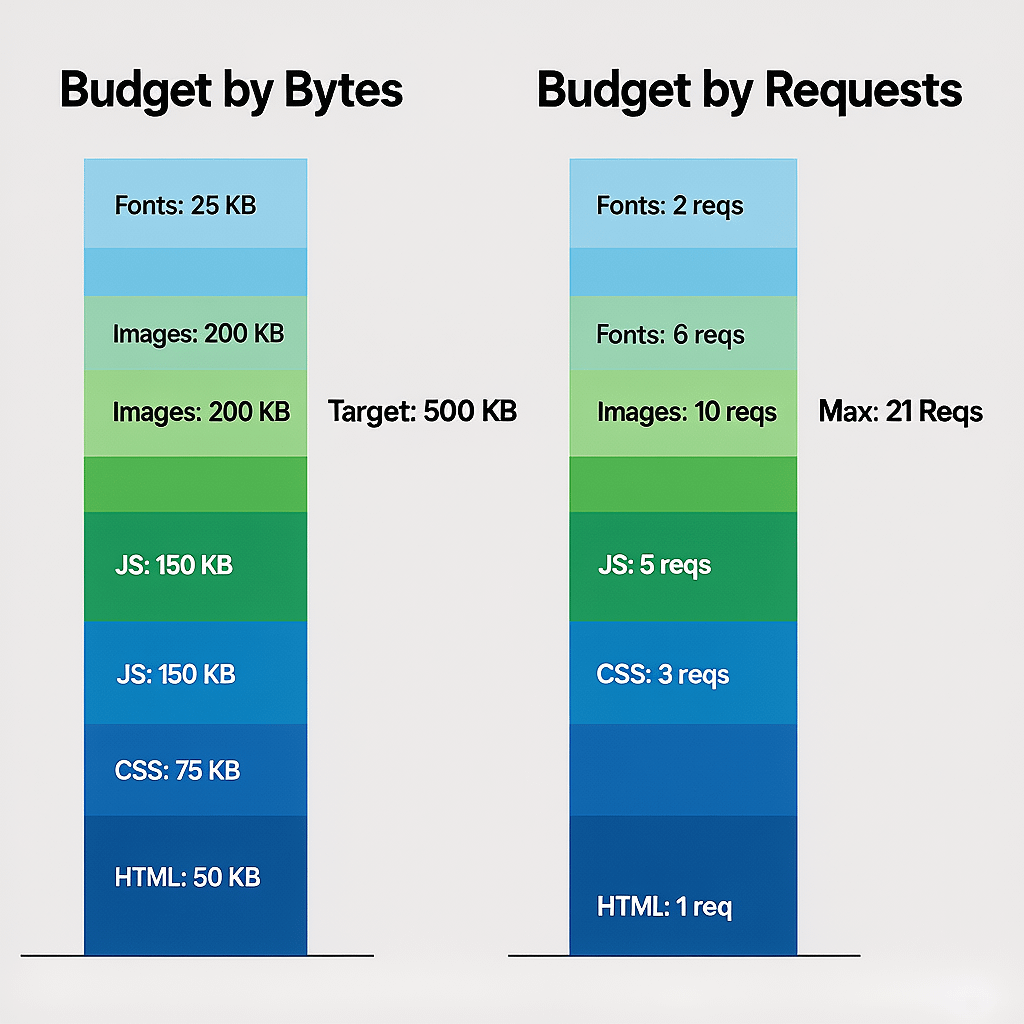
- Set a performance budget that the optimize website load time checklist will enforce on every release.
- Benchmark with multiple tools before changes to anchor the optimize website load time checklist.
- Upgrade PHP or runtime versions as a standard part of your optimize website load time checklist.
- Enable HTTP 2 or HTTP 3 to cut waits per the optimize website load time checklist.
- Activate full page caching to power the optimize website load time checklist baseline.
- Configure object caching to support the optimize website load time checklist at scale.
- Adopt a CDN and map assets as required by the optimize website load time checklist.
- Set cache busting filenames to keep the optimize website load time checklist safe during deploys.
- Inline critical CSS to follow the optimize website load time checklist for first paint.
- Defer non critical CSS which the optimize website load time checklist recommends.
- Async or defer JavaScript consistent with the optimize website load time checklist.
- Load heavy widgets on user interaction per the optimize website load time checklist.
- Preload key resources that the optimize website load time checklist identifies as render blockers.
- Preconnect to third party origins sparingly as the optimize website load time checklist notes.
- Remove unused CSS and JS in line with the optimize website load time checklist.
- Convert images to WebP or AVIF per the optimize website load time checklist.
- Resize and serve responsive images as the optimize website load time checklist requires.
- Exclude hero images from lazy loading to protect LCP within the optimize website load time checklist.
- Use CSS containment and will change carefully per the optimize website load time checklist.
- Subset fonts and set font display swap according to the optimize website load time checklist.
- Self host critical fonts in the optimize website load time checklist for fewer connections.
- Reduce DOM depth per the optimize website load time checklist to limit layout cost.
- Eliminate layout thrashing using the optimize website load time checklist checks.
- Defer analytics until after first paint as the optimize website load time checklist suggests.
- Throttle third party tags per the optimize website load time checklist governance.
- Use long lived cache headers for static assets as the optimize website load time checklist sets.
- Adopt immutable and ETag rules per the optimize website load time checklist.
- Minify HTML, CSS, JS following the optimize website load time checklist pipeline.
- Enable Brotli compression consistent with the optimize website load time checklist.
- Split bundles by route for the optimize website load time checklist to reduce first loads.
- Hydrate only islands in the optimize website load time checklist to minimize JS.
- Queue background tasks to keep requests light for the optimize website load time checklist.
- Protect CPU with requestIdleCallback patterns in the optimize website load time checklist.
- Monitor Core Web Vitals as a standing rule in the optimize website load time checklist.
- Set CI performance budgets to guard this optimize website load time checklist.
- Audit results monthly and prune regressions via the optimize website load time checklist.
- Document owners for each area so the optimize website load time checklist stays alive.
Common Mistakes That Slow You Down
- Inline everything and bloat HTML. The optimize website load time checklist reserves inlining for true critical content.
- Lazy load hero images. The optimize website load time checklist excludes above the fold media to preserve LCP.
- Overusing preconnect and preload. The optimize website load time checklist limits hints to a few critical assets.
- Letting plugins auto inject scripts on every page. The optimize website load time checklist prefers route scoped loading.
- Ignoring cache invalidation. The optimize website load time checklist requires versioned assets to avoid stale bugs.
Team Workflow And Governance
Make performance part of definition of done. The optimize website load time checklist becomes a living standard when product and engineering sign off on speed budgets.
Train content editors on media uploads and alt text. The optimize website load time checklist only works if marketing and devs follow the same rules.
For ongoing support, our social media marketing services team can also help amplify your faster pages after the optimize website load time checklist lifts performance.
FAQs
How often should I run this optimize website load time checklist?
At least quarterly, after major releases, and after adding new media or tags. Treat the optimize website load time checklist like a health check across your critical templates.
What tools help validate an optimize website load time checklist?
Use PageSpeed Insights, Lighthouse, WebPageTest, and your CDN logs. Run multiple times and average results. The optimize website load time checklist also benefits from RUM data for field truth.
Does a CDN replace the need for an optimize website load time checklist?
No. A CDN accelerates delivery, but you still need clean code, compressed media, and disciplined third party controls. Keep the optimize website load time checklist active.
Will lazy loading images always improve my optimize website load time checklist results?
It helps most pages, but do not lazy load above the fold images. Test thresholds and exclusions. The optimize website load time checklist aims to protect LCP first.
What is a good target for the optimize website load time checklist outcomes?
Under 2.5 seconds LCP, near zero CLS, and snappy interactions. Aim for a green Core Web Vitals label. The optimize website load time checklist keeps you focused on those goals.
Is image format conversion required in an optimize website load time checklist?
Yes. WebP or AVIF plus smart compression is a must. It is a core part of any optimize website load time checklist across modern stacks.
Can a WordPress site pass the optimize website load time checklist without a developer?
Many quick wins are doable without code, but complex template and JS work may need a developer. Start with the optimize website load time checklist and escalate as needed.
References
About the Author