

Feature image: prerendering at the edge makes JavaScript apps instantly crawlable while improving Core Web Vitals. Images on this page are compressed for speed.
Prerendering with Cloudflare Workers: 19 Powerful Wins
By Morne de Heer · Published by Brand Nexus Studios

If your SPA looks amazing to users but invisible to bots, prerendering with Cloudflare Workers is your best friend. It lets you ship fully rendered HTML to crawlers and previews while serving blazing fast client-side experiences to people. The result is higher crawlability, better indexing, and lower time to content.
Additionally, prerendering with Cloudflare Workers puts the heavy lifting at the edge. That means faster first paint, consistent meta tags, and shareable Open Graph previews that always load the right title and image. You get SEO wins without rewriting your app from scratch.
Because search engines evolve quickly, you need a solution that respects modern guidance while delivering practical results. Prerendering with Cloudflare Workers can operate like lightweight edge SSR, with caching that dramatically reduces TTFB and origin load during traffic spikes.
In this guide, you will learn how prerendering with Cloudflare Workers works, when to use it, how to implement it safely, what to cache, and how to measure the SEO impact. You will also get production-ready code patterns, plus 19 powerful wins you can put in place today.
What is prerendering and why Cloudflare Workers?
Prerendering with Cloudflare Workers is the practice of generating server-ready HTML for routes that matter to bots and sometimes to first user hits. Your app remains a modern SPA or hybrid framework, but you expose crawlable markup at the edge.
Because Workers run close to users and bots, prerendering with Cloudflare Workers removes latency and avoids origin bottlenecks. The Worker inspects requests, decides who should get a prerendered response, fetches or generates that HTML, then caches it for instant reuse.
Most teams adopt prerendering with Cloudflare Workers to fix crawl gaps, stabilize social previews, and uplift Core Web Vitals. It becomes a powerful bridge between your JS app and search engines, while keeping your current development workflow intact.
How prerendering with Cloudflare Workers works at the edge
At a high level, prerendering with Cloudflare Workers follows a simple flow. The Worker receives a request, performs bot detection, checks a cache, and either serves a cached snapshot or generates a fresh one. For humans, it proxies to your origin app unchanged.
- Detect the requester. If it is a known crawler or link preview agent, enable prerender mode.
- Look up a cached snapshot. If present and fresh, return it immediately with the correct headers.
- If no snapshot exists, generate one via a rendering service or headless browser, sanitize, then cache.
- Serve your standard app to human visitors with no extra overhead.
Because you are doing prerendering with Cloudflare Workers, you can also tune cache TTLs by route, prewarm critical pages, or use stale-while-revalidate to stay resilient during render errors or provider hiccups.
19 powerful wins from prerendering with Cloudflare Workers
- Instantly crawlable HTML for JS apps. Prerendering with Cloudflare Workers gives bots complete, link-rich content without waiting for JavaScript execution.
- Better index coverage. Hard-to-render routes become visible, and prerendering with Cloudflare Workers reduces soft 404s on content-heavy pages.
- Stable Open Graph and Twitter Cards. Social previews always show correct titles and images because prerendering with Cloudflare Workers ships HTML with the right meta tags.
- Faster TTFB for bots. Cached snapshots load at edge speed, and prerendering with Cloudflare Workers cuts round trips to your origin.
- Lower origin cost. You cache once and serve many, so prerendering with Cloudflare Workers shrinks CPU and bandwidth at your host.
- Improved Core Web Vitals. Search engines see ready-to-index content, and prerendering with Cloudflare Workers helps Largest Contentful Paint and CLS stability.
- Safer migrations. During framework upgrades, prerendering with Cloudflare Workers keeps SEO steady while you refactor.
- Cleaner link equity. Canonicals and hreflang are consistent when prerendering with Cloudflare Workers manages head tags.
- Fine-grained control. Route-specific rules let prerendering with Cloudflare Workers treat product pages differently from blog posts.
- Resilient caching. With stale-while-revalidate, prerendering with Cloudflare Workers keeps pages fast even if rendering hiccups happen.
- Shareable previews in apps. Messaging apps fetch perfect snippets because prerendering with Cloudflare Workers includes Open Graph tags.
- Analytics clarity. When bots get HTML snapshots, prerendering with Cloudflare Workers avoids bot-induced UI errors that skew metrics.
- Staging confidence. Test bots see what production will show, and prerendering with Cloudflare Workers improves QA for SEO scenarios.
- Progressive rollout. Start with key routes while prerendering with Cloudflare Workers, then expand as you measure gains.
- Framework agnostic. Whether React, Vue, Svelte, or Angular, prerendering with Cloudflare Workers plays nicely with your stack.
- Simple to revert. If needed, you can pause prerendering with Cloudflare Workers by changing a single routing rule.
- Edge-first privacy. Keep sensitive pages out of scope, and prerendering with Cloudflare Workers protects authenticated areas by design.
- SEO momentum. Combined with smart internal linking, prerendering with Cloudflare Workers helps new pages rank sooner.
- Future friendly. Even as rendering guidance evolves, prerendering with Cloudflare Workers provides a practical, cacheable baseline.
Architecture patterns for prerendering with Cloudflare Workers
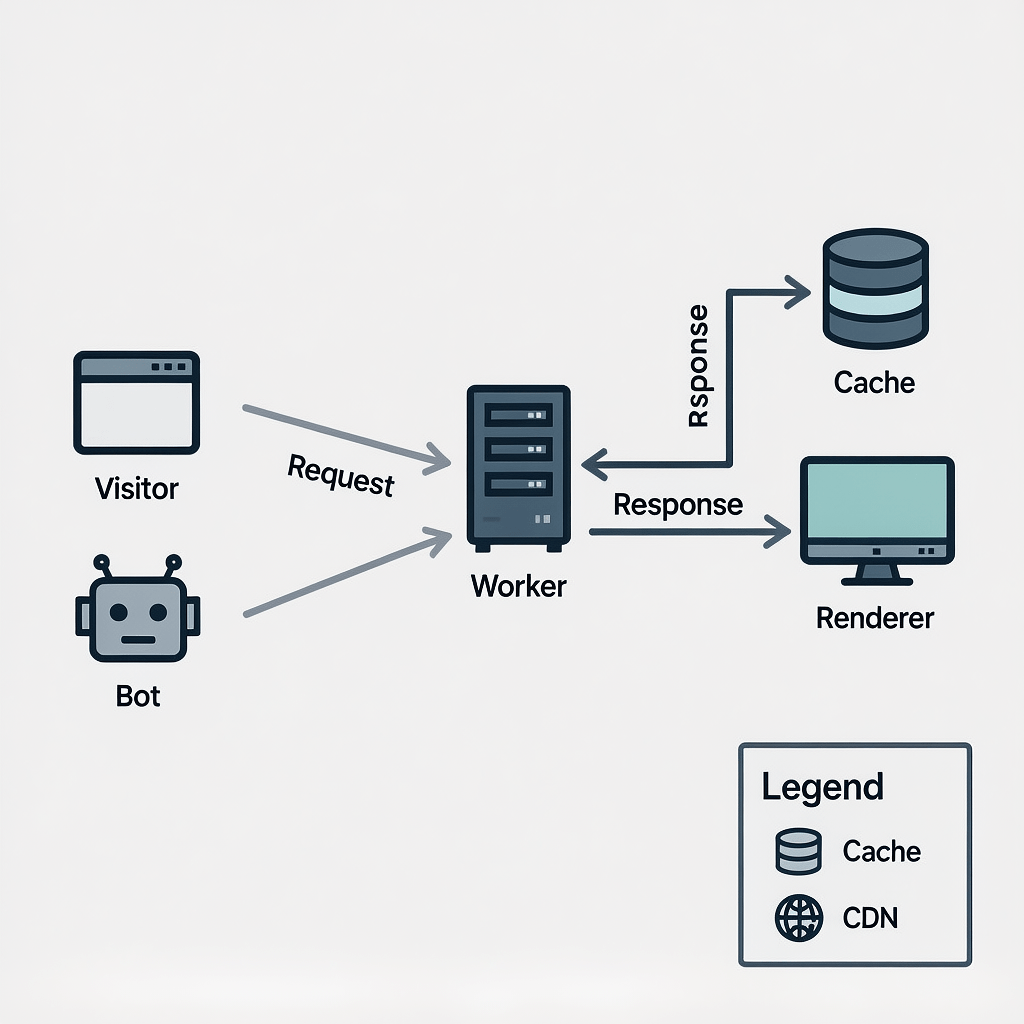
Pattern 1: Proxy to a render service
In this model, prerendering with Cloudflare Workers forwards bot traffic to a trusted rendering service. The service returns fully baked HTML which the Worker sanitizes, headers correctly, and caches. This reduces maintenance and lets you leverage proven renderers.
Pattern 2: Prebuilt snapshots
For content that rarely changes, prerendering with Cloudflare Workers can serve prebuilt HTML snapshots stored in KV or R2. Updates are published on deploy, and the Worker simply fetches the latest snapshot by route key.
Pattern 3: Browser rendering
Where your plan permits, prerendering with Cloudflare Workers can invoke a headless browser through Cloudflare Browser Rendering. This gives maximum fidelity for complex apps. Cache aggressively to keep costs and latency in check.
Core code pattern for prerendering with Cloudflare Workers
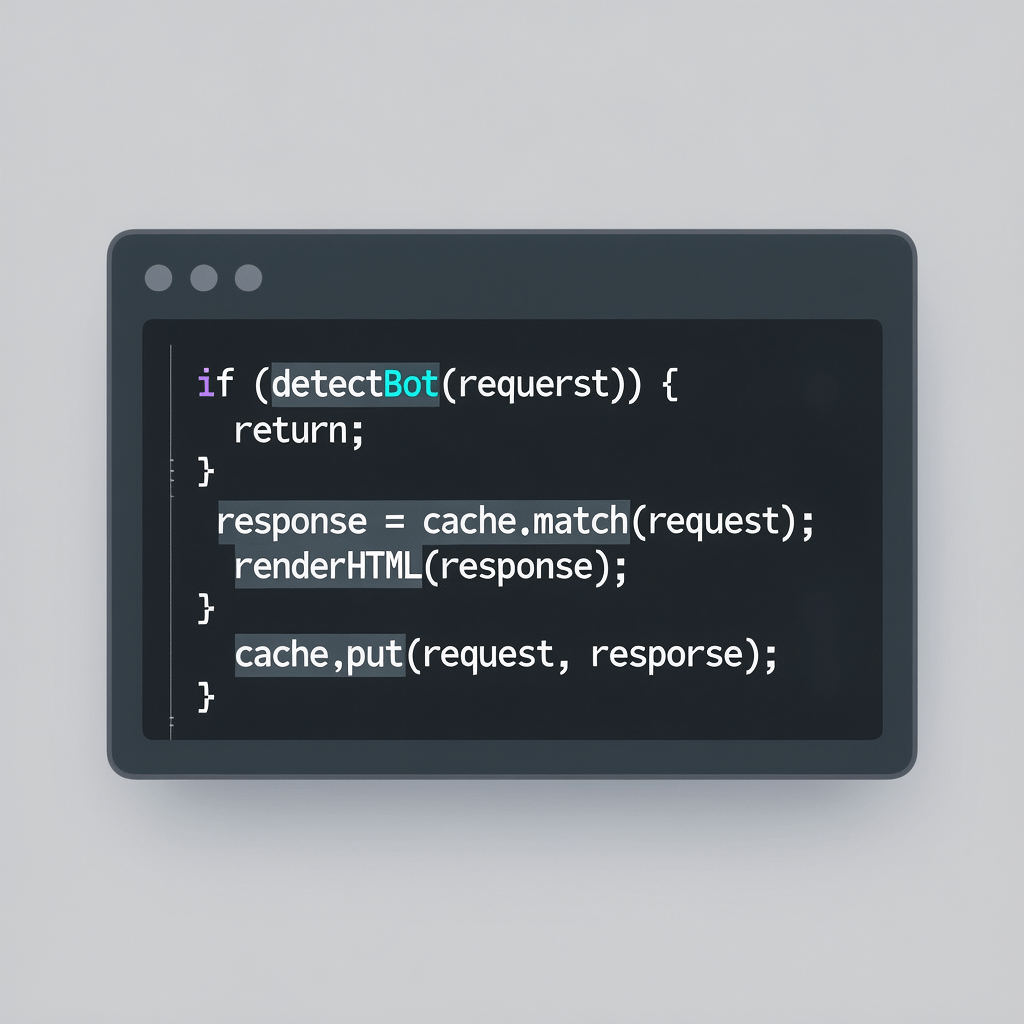
Below is a simplified Worker that demonstrates bot detection, Cache API use, and a prerender fetch. Adapt it to your renderer of choice and your app routes.
export default {
  async fetch(request, env, ctx) {
    const url = new URL(request.url);

    // 1) Bot detection
    const ua = request.headers.get("User-Agent") || "";
    const isBot = /(googlebot|bingbot|yandex|baiduspider|duckduckbot|slurp|facebookexternalhit|twitterbot|linkedinbot|embedly|pinterest|quora|discord|whatsapp)/i.test(ua);

    // Only prerender for GET HTML requests
    const accept = request.headers.get("Accept") || "";
    const wantsHTML = accept.includes("text/html");

    if (!wantsHTML || !isBot) {
      // Serve humans and non-HTML as usual
      return fetch(request);
    }

    // 2) Edge cache lookup
    const cacheKey = new Request(url.toString(), { method: "GET", headers: { "Accept": "text/html" } });
    const cache = caches.default;
    let response = await cache.match(cacheKey);
    if (response) return response;

    // 3) Render or proxy to a prerenderer
    // Example: replace with your renderer endpoint
    const rendererUrl = `https://renderer.example.com/render?url=${encodeURIComponent(url.toString())}`;

    let renderResp = await fetch(rendererUrl, {
      headers: { "User-Agent": ua }
    });

    if (!renderResp.ok) {
      // Fallback to origin if renderer fails
      return fetch(request);
    }

    // 4) Normalize headers and cache
    let html = await renderResp.text();
    response = new Response(html, {
      status: 200,
      headers: {
        "Content-Type": "text/html; charset=utf-8",
        "Cache-Control": "public, max-age=600, s-maxage=600, stale-while-revalidate=86400",
        "Vary": "Accept-Encoding, User-Agent",
      },
    });

    ctx.waitUntil(cache.put(cacheKey, response.clone()));
    return response;
  }
};
This baseline shows where prerendering with Cloudflare Workers fits. You will extend it with route scoping, stricter bot validation, timeouts, and KV or R2 storage for durable snapshots.
Step-by-step: implement prerendering with Cloudflare Workers
Follow these steps to roll out prerendering with Cloudflare Workers safely and iteratively.
- Scope routes. Choose public content routes first. Keep authenticated dashboards and carts out of scope for prerendering with Cloudflare Workers.
- Define bots. Build a conservative allowlist. Update it quarterly. Document why each agent receives prerendering with Cloudflare Workers.
- Create the Worker. Start from the code above. Add logging for decision points so you can prove prerendering with Cloudflare Workers is routing as expected.
- Pick a renderer. Use a managed service, prebuilt snapshots, or Cloudflare Browser Rendering where available. Keep the interface simple so prerendering with Cloudflare Workers stays maintainable.
- Set caching rules. Use the Cache API and set TTLs by route type. For news, keep TTLs small. For evergreen pages, prerendering with Cloudflare Workers can cache longer.
- Rewrite head tags. Ensure title, description, Open Graph, and structured data are present in the prerendered HTML. This is where prerendering with Cloudflare Workers shines.
- Harden security. Add request timeouts, size limits, and blocklist unsafe query patterns to protect prerendering with Cloudflare Workers from abuse.
- QA and validation. Spoof User-Agent strings, compare HTML, and run Search Console tests to confirm prerendering with Cloudflare Workers serves perfect snapshots.
- Observe metrics. Track cache hit rate, TTFB, index coverage, and ranking movement. Prerendering with Cloudflare Workers should reduce crawl errors and improve coverage.
- Roll out gradually. Start with 10 percent of bots or a subset of routes. As you gain confidence, expand prerendering with Cloudflare Workers across the rest.
Caching strategy for prerendering with Cloudflare Workers

The biggest performance leap in prerendering with Cloudflare Workers comes from caching. Combine CDN caching with the Cache API for flexibility. Use ETag and Last-Modified where possible, and vary by Accept-Encoding and User-Agent only if you must.
- Evergreen content. TTL 1 to 24 hours. Rely on stale-while-revalidate to avoid thundering herds when popular links trend.
- News and listings. TTL 5 to 15 minutes. Prerendering with Cloudflare Workers can prewarm top stories on publish.
- Product pages. TTL 15 to 60 minutes. Shorten when inventory and price change quickly.
Store last-known-good snapshots in KV or R2 to survive renderer outages. If rendering fails, prerendering with Cloudflare Workers should serve the cached snapshot and requeue a refresh.
Bot detection and safe routing
Bot detection is the gatekeeper for prerendering with Cloudflare Workers. A simple allowlist of major crawlers works well. For Googlebot in critical flows, add reverse DNS validation when feasible.
- Googlebot and Google-InspectionTool
- Bingbot
- DuckDuckBot
- Yandex and Baidu where applicable
- FacebookExternalHit, Twitterbot, LinkedInBot, Discord, WhatsApp, Slack link expanders
Keep the list small and auditable. Humans should not receive prerendered HTML. This separation makes prerendering with Cloudflare Workers both safe and predictable.
Security and reliability best practices
With great power comes responsibility. Treat prerendering with Cloudflare Workers like an edge application. Validate inputs, set timeouts, and avoid creating an open proxy.
- Timeouts. Abort render calls after 5 to 10 seconds. Fall back to cache or origin.
- Size limits. Cap rendered HTML size to prevent abuse.
- Sanitization. Strip unsafe scripts added by third parties before caching.
- Scope control. Exclude private and authenticated routes from prerendering with Cloudflare Workers.
- Error paths. Serve a last-known-good snapshot on renderer errors and log everything.
Monitoring, analytics, and reporting

Measure what matters. If prerendering with Cloudflare Workers is working, you will see faster TTFB for bots, fewer rendering-related errors, and better index coverage. You can also correlate improvements in rankings and click-through rate on key pages.
Need help connecting SEO, performance, and business KPIs end to end? Our team can support planning and measurement. Explore our analytics and reporting approach to keep your improvements on track.
Testing and validation workflow
Do not ship blind. Validate that prerendering with Cloudflare Workers sends the right HTML to bots and the normal app to humans.
- CLI checks. Use curl with a bot user agent and confirm the returned HTML is fully rendered.
- Search Console. Test representative URLs with URL Inspection to verify rendering and structured data.
- Link previews. Paste URLs into Slack, WhatsApp, X, and LinkedIn to ensure meta tags are correct.
- Performance. Compare TTFB with and without prerendering with Cloudflare Workers across regions.
Common pitfalls to avoid
Most issues come from overly broad rules or weak caching. Avoid these mistakes when deploying prerendering with Cloudflare Workers.
- Prerendering everything. Keep humans on the standard app unless you have a strong reason.
- No cache strategy. Without TTLs and SWR, prerendering with Cloudflare Workers will feel slow and expensive.
- Unsafe input. Validate URLs and query parameters passed to your renderer.
- Forgotten meta tags. Ensure canonical, robots, and Open Graph tags exist in snapshots.
- Missing compression. Always compress images and HTML to keep pages under budget. Mention that images here are compressed for page speed and that caching is in place for repeat views.
When prerendering with Cloudflare Workers is a perfect fit
Consider this approach when your SPA depends heavily on client-side rendering and you need fast SEO results. If a full SSR migration is not feasible right now, prerendering with Cloudflare Workers gives you an edge-first improvement path.
It is also ideal for sites with frequent social sharing where accurate previews drive clicks. Because you control meta tags at the edge, prerendering with Cloudflare Workers stabilizes preview quality across platforms.
Complementary upgrades that pair well
Combine prerendering with Cloudflare Workers and smart site architecture to multiply gains. Tighten internal linking, upgrade your sitemaps, and fix orphan pages to help crawlers discover fresh content faster.
If you are planning a UI refresh or new component library, coordinate changes with your prerender rollout. Our website design and development team can help you bake performance and SEO into your design system from day one.
Practical SEO tactics to stack with prerendering
- Ensure titles and meta descriptions are unique and reflect search intent.
- Use descriptive anchor text internally to spread link equity.
- Adopt structured data for articles, products, and FAQs as relevant.
- Localize carefully and set hreflang for multilingual sites.
- Keep your sitemap updated and ping major search engines on publish.
For a hands-on partner to connect technical foundations with growth, explore our SEO services. We deploy prerendering with Cloudflare Workers alongside content strategy to unlock sustainable visibility.
Frequently asked questions
These answers summarize common questions about prerendering with Cloudflare Workers and how to deploy it with confidence.
What is prerendering with Cloudflare Workers?
It is the process of generating ready-to-index HTML at the edge for bots and selective contexts, while keeping your standard SPA experience for people. Prerendering with Cloudflare Workers improves crawlability, index coverage, and preview consistency without a full SSR rewrite.
Is dynamic rendering still recommended for SEO?
Dynamic rendering as a permanent solution is not encouraged. That said, prerendering with Cloudflare Workers can act like edge SSR when paired with caching, structured data, and route scoping. It is a pragmatic step that delivers real results.
How should I detect bots safely?
Use a conservative allowlist and validate UA patterns. For critical bots like Googlebot, reverse DNS checks add confidence. Keep humans on the standard app to avoid UX surprises and data inconsistencies.
What about personalized or logged-in pages?
Exclude them. Prerendering with Cloudflare Workers is for public content. Keep private and transactional pages outside prerender scope to protect users and avoid caching sensitive data.
How do I measure success?
Track index coverage, time to render, cache hit ratio, and ranking changes. When prerendering with Cloudflare Workers is effective, you will see fewer crawl errors and faster inclusion in search results.
What is the maintenance overhead?
Minimal if you keep the architecture simple. Update the bot list periodically, review cache policies, and ensure your render source remains reliable. Most teams find the upside far outweighs the upkeep.
Wrapping up
You do not need to refactor your entire app to win with SEO. Prerendering with Cloudflare Workers gives you a fast, edge-first upgrade that bots love and users never notice. When you combine it with smart caching, strict routing, and disciplined QA, it pays dividends in visibility and revenue.
If you want expert support implementing this playbook, the team at Brand Nexus Studios can help scope, build, and optimize the system around your business goals.
References
About the Author





Beste pornosites bieden hoogwaardige inhoud voor volwassen entertainment.
Kies voor betrouwbare hubs voor een veilige en plezierige ervaring.
Take a look at my blog … BUY RIVOTRIL