

Effective SEO-friendly website design integrates technical structure, user experience, and aesthetics from the very beginning.
SEO-Friendly Website Design: 7 Crucial Steps for Success
By Morne de Heer, Published by Brand Nexus Studios
Have you ever visited a stunningly beautiful website that was impossible to find on Google? Or landed on a top-ranking page that was a cluttered, unusable mess? This disconnect is where countless businesses falter. They treat design and search engine optimization as two separate tasks when, in reality, they are two sides of the same coin.
This guide demystifies the process by providing a complete playbook on SEO-friendly website design. We are bridging the gap between what business owners need to know and what developers need to implement. Great design attracts users, but great SEO brings them to your door in the first place.

Forgetting this crucial link means leaving money on the table. A website that isn’t built on a solid SEO foundation is like a brilliant storefront hidden in a back alley with no signs. It might be amazing, but no one will ever find it. Let’s change that.
The Business Case: Why SEO-Friendly Design is Non-Negotiable
Before diving into the technical “how-to,” it’s essential for stakeholders, marketers, and business owners to understand the “why.” Investing in SEO-friendly website design isn’t just a marketing expense; it’s a fundamental investment in a sustainable digital asset.
The High Cost of Ignoring SEO in Your Design Phase
Launching a website without considering SEO from day one can lead to costly and time-consuming problems down the road. Many businesses fall into this trap, focusing solely on visual appeal while neglecting the underlying structure that search engines need to see.
This oversight results in what’s known as “SEO debt.” You end up with a site that requires extensive, and often expensive, retrofitting to make it visible. It’s far more efficient to build it right the first time.
Think about lost traffic. Every day your site is invisible on Google is a day your competitors are capturing your potential customers. This invisibility directly impacts your bottom line, as organic search is often the highest converting traffic source.
Furthermore, a poor technical foundation often correlates with a poor user experience. Slow load times and confusing navigation, both SEO killers, frustrate visitors and send them running to your competitors. This increases your bounce rate, a signal to Google that your site isn’t valuable.
The Tangible Benefits of a Unified SEO and Design Strategy
Conversely, when you prioritize an SEO-friendly website design, you build a powerful engine for growth. The benefits extend far beyond just ranking for a few keywords.
You achieve sustainable organic growth. Unlike paid ads that stop when you stop paying, a well-optimized site continuously attracts free, high-intent traffic. This creates a predictable stream of leads and customers over the long term.
It also enhances your brand’s credibility. Ranking high on Google positions you as an authority in your field. Users inherently trust search engine results, and appearing at the top lends your brand an invaluable layer of trust and legitimacy.
Ultimately, this leads to higher conversion rates. An SEO-friendly website is, by its nature, user-friendly. It’s fast, easy to navigate, and accessible on all devices. This seamless experience guides users toward taking your desired action, whether it’s making a purchase, filling out a form, or picking up the phone.
Pillar 1: Mobile-First and Responsive Design
The first and most critical pillar of any modern SEO-friendly website design is its approach to mobile devices. It is no longer enough for a site to simply “work” on a phone; it must be designed for the mobile experience first.
Google officially uses mobile-first indexing. This means the mobile version of your website is the baseline for how Google determines your rankings. If your mobile site is a stripped-down, clunky version of your desktop site, your SEO will suffer immensely, no matter how great your desktop experience is.
What Does Mobile-First Truly Mean?
It’s a shift in design philosophy. Instead of designing a large, complex desktop site and then trying to shrink it to fit a mobile screen, you start with the mobile design. This forces you to prioritize the most essential content and features, leading to a cleaner, more focused user experience on all devices.
Key components of responsive design include:
- Fluid Grids: Using relative units like percentages instead of fixed units like pixels for page element sizing.
- Flexible Images: Ensuring images resize within their containing elements without overflowing or breaking the layout.
- CSS Media Queries: Applying different CSS styles based on the characteristics of the device, primarily the screen width.
A truly responsive design ensures a seamless and optimal experience whether a user is on a 4-inch smartphone, a 10-inch tablet, or a 27-inch desktop monitor. Test your site constantly on real devices to catch any usability issues.
Pillar 2: Blazing-Fast Page Speed
In the world of SEO, speed is king. A slow-loading website is one of the quickest ways to lose both visitors and search engine favor. Page speed has been a ranking factor for years, and its importance is only growing with Google’s focus on Core Web Vitals.
Core Web Vitals are a set of specific metrics Google uses to measure a page’s overall user experience. They consist of:
- Largest Contentful Paint (LCP): How long it takes for the largest content element (e.g., an image or block of text) on the page to become visible. Aim for under 2.5 seconds.
- First Input Delay (FID): How long it takes for the browser to respond to a user’s first interaction (e.g., clicking a button). Aim for under 100 milliseconds.
- Cumulative Layout Shift (CLS): How much the page layout unexpectedly shifts during loading. Aim for a score below 0.1.
Improving these scores is a direct route to better SEO. Here’s how design and development play a role in achieving that.
Practical Steps for a Faster Website
Achieving a fast website is a core tenet of SEO-friendly website design. It requires a concerted effort across several areas.
Image Optimization is a Must
Large, uncompressed images are the most common cause of slow websites. Every image you upload should be compressed to reduce its file size without a significant loss in quality. Use modern image formats like WebP, which offer superior compression compared to traditional JPEGs and PNGs. Always ensure images are sized appropriately for their container.

Leverage Browser Caching
Browser caching allows a user’s browser to store parts of your website (like images, CSS, and JavaScript files) locally. When they revisit your site, their browser can load these files from its cache instead of re-downloading them, resulting in a much faster experience. This is often managed through your website hosting.
For WordPress users, a robust caching plugin is essential. However, the quality of your hosting provider plays an enormous role. A professional partner like Brand Nexus Studios can provide optimized hosting environments configured for maximum speed and security, taking the guesswork out of caching and server-side optimizations.
Minify Your Code
Minification is the process of removing all unnecessary characters from your website’s code (HTML, CSS, and JavaScript) without changing its functionality. This includes removing white space, comments, and line breaks. Smaller file sizes mean faster download times for the browser, contributing directly to a better LCP score.
Pillar 3: Intuitive Site Architecture and Navigation
A logical site architecture is the backbone of any SEO-friendly website design. It helps both users and search engine crawlers understand the structure of your site, find content easily, and recognize the relationship between different pages.
Imagine your website is a library. A good architecture is like a well-organized card catalog and clear signage, guiding people to the exact book they need. A poor architecture is like throwing all the books into a single pile on the floor. It’s chaotic, confusing, and unusable.
Creating a Logical URL Structure
Your URL structure should be clean, descriptive, and hierarchical. It should reflect the path a user takes to get to a specific page. This not only helps with SEO but also improves user experience.
Consider this example for an e-commerce site:
- Bad: `example.com/products?id=123`
- Good: `example.com/mens/shoes/running-sneakers`
The good example is immediately understandable to both humans and search engines. It uses keywords and clearly shows the page’s position within the site’s hierarchy.
The Importance of a Silo Structure
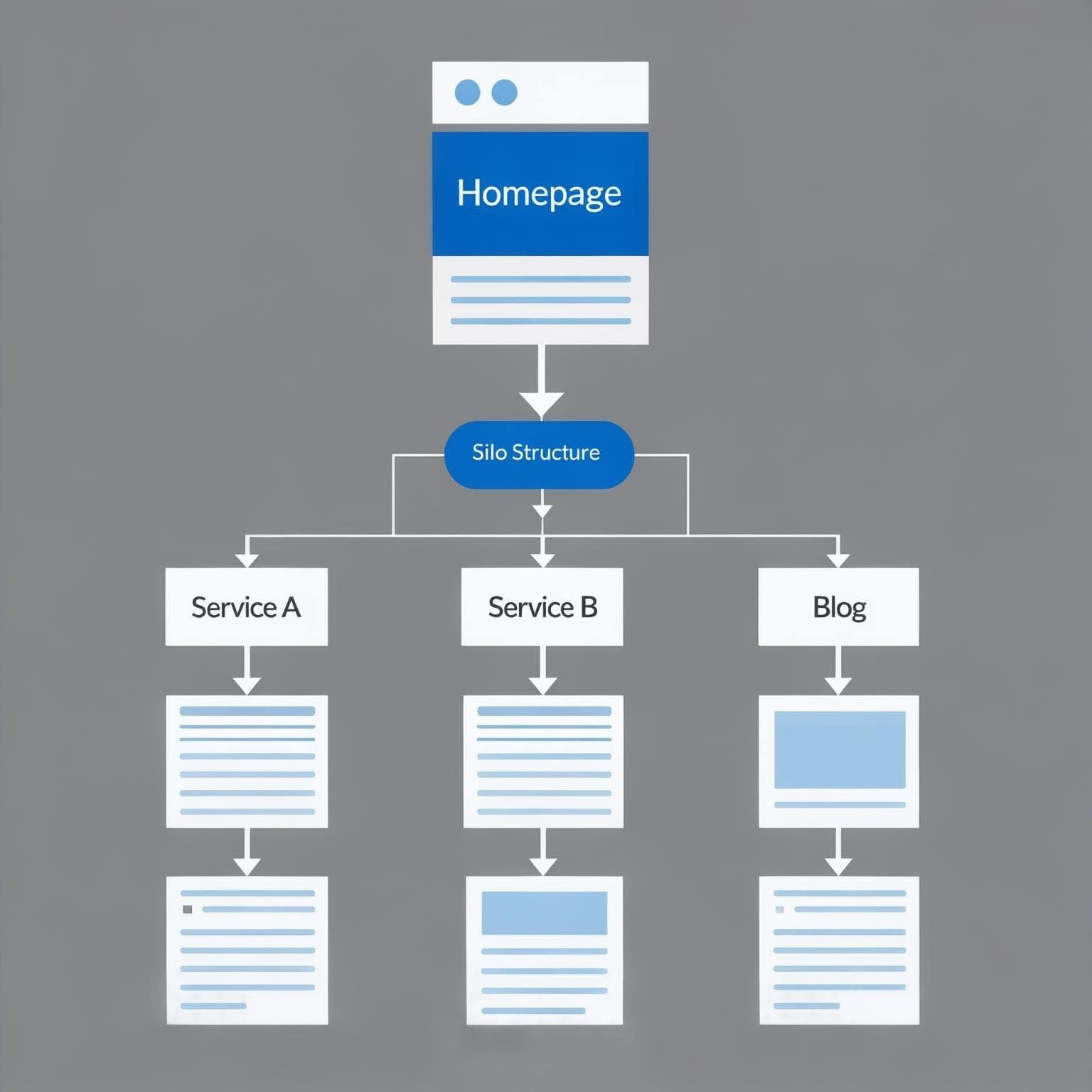
A silo structure involves organizing your site’s content into distinct categories. All content related to a specific topic is grouped together under a parent category page. These pages are then interlinked, strengthening the topical relevance of that entire section of your site.
This organization helps distribute “link equity” or “PageRank” throughout your site effectively. It signals to Google that you are an authority on that particular topic, making it easier to rank for related keywords. Your main navigation menu should reflect these top-level silos.
Don’t Forget Breadcrumbs
Breadcrumbs are a secondary navigation aid that shows users where they are on your site. They typically appear at the top of a page and look something like this: `Home > Services > Web Design`.
They serve two key purposes for an SEO-friendly website design. First, they improve user experience by making it easy for users to navigate back to higher-level pages. Second, they help search engines understand your site’s structure and strengthen internal links.
The Developer’s Technical SEO Checklist
With the foundational pillars established, it’s time to dive into the more technical elements that developers must implement. This is where the design vision is translated into code that search engines can read and reward. A truly SEO-friendly website design depends on this meticulous execution.
On-Page SEO Elements to Code Correctly
These are the basic building blocks of on-page optimization. While a content marketer might write them, the developer is responsible for ensuring they are implemented correctly in the site’s HTML.
Title Tags and Meta Descriptions
The title tag is one of the most important on-page SEO factors. It should be unique for every page, include the primary keyword, and be under 60 characters. The meta description is the short snippet of text that appears under your title in search results. While not a direct ranking factor, a compelling meta description dramatically improves click-through rates.
A Flawless Heading Hierarchy
Proper use of heading tags (`<h1>`, `<h2>`, `<h3>`, etc.) is crucial for structuring content. There should only be one `<h1>` tag per page, which is typically the main title of the page or post. `<h2>` tags should be used for main subheadings, and `<h3>` tags for sub-points within those sections. This hierarchy helps search engines understand the main topics of your content.
Image SEO: Alt Text is Not Optional
Every image on your site needs descriptive alt text (alternative text). This text is used by screen readers for visually impaired users and by search engines to understand the content of an image. Writing descriptive, keyword-rich alt text is a simple yet powerful SEO tactic. The filename of the image should also be descriptive (e.g., `seo-friendly-website-design-sitemap.jpg` instead of `IMG_1234.jpg`).
Structured Data and Schema Markup
Schema markup is a type of microdata that you add to your website’s HTML to help search engines better understand your content. It’s like providing a translation layer for Google. By clearly labeling elements like your business address, reviews, or event dates, you can become eligible for “rich snippets” in search results.
Rich snippets are enhanced search results that include extra visual information, such as star ratings, images, or FAQ dropdowns. They make your listing stand out and can significantly boost your click-through rate. Implementing schema is a hallmark of an advanced SEO-friendly website design.
Common schema types include:
- Article: For blog posts and news articles.
- LocalBusiness: For your company’s name, address, phone number, and hours.
- Product: For e-commerce pages, including price, availability, and reviews.
- FAQPage: For frequently asked questions sections, which can appear as dropdowns in search results.
Implementing schema using JSON-LD is the method recommended by Google. It involves adding a script to the head of your HTML, which is clean and separate from your page’s content.
Ensuring Crawlability and Indexability
Your beautiful, fast, and well-structured website is useless if search engines can’t find or read its pages. This is where crawlability and indexability come in.
The Role of robots.txt
The `robots.txt` file is a simple text file located in your site’s root directory. It tells search engine crawlers which pages or sections of your site they should not access. It’s commonly used to block staging sites, admin pages, or thin content pages from being indexed.
Generating an XML Sitemap
An XML sitemap is a list of all the important URLs on your website. It acts as a roadmap for search engines, helping them discover all your content, especially new pages or those that are not well-linked internally. Submitting your sitemap to Google Search Console is a fundamental step in any SEO strategy. Building a site with a clear structure is part of the expert website design and development process that ensures all pages are logically organized for sitemap generation.
Implementing Canonical Tags
Sometimes, you may have multiple pages with very similar or identical content (e.g., a product page accessible via several different category URLs). This can cause duplicate content issues. The canonical tag (`rel=”canonical”`) tells search engines which version of a page is the “master” copy that should be indexed, consolidating your ranking signals to a single URL.
Content and Design Synergy
The final piece of the puzzle is ensuring that your visual design and your content strategy work together, not against each other. An SEO-friendly website design considers how content will be displayed and consumed from the very start.
Designing for Readability and Engagement
Great SEO gets people to your page, but great design keeps them there. Readability is paramount. Factors like font choice, font size, line height, and color contrast all play a role in how easily a user can consume your content.
White space is a designer’s best friend. A cluttered page with no room to breathe is overwhelming and difficult to read. Generous use of white space guides the user’s eye, improves focus, and creates a more professional and pleasant experience. Short paragraphs and the use of lists also make content more scannable and digestible on mobile devices.

Integrating Keywords Naturally into Design Elements
Designers and content creators must collaborate. A designer might create a beautiful hero section with a short, punchy headline. However, if that headline needs to be a keyword-rich H1 tag for SEO purposes, the design must be flexible enough to accommodate it without looking awkward.
This collaboration ensures that SEO requirements are baked into the design process. It means planning for keyword-rich headings, body copy, and image captions from the wireframe stage. A truly integrated team, like the one at Brand Nexus Studios, understands that the best results come when search engine optimization is not an afterthought but a core component of the entire design and development lifecycle.
Frequently Asked Questions about SEO-Friendly Website Design

What is SEO-friendly website design?
SEO-friendly website design is the process of designing and developing a website in a way that makes it easy for search engines like Google to crawl, understand, and rank its content. It combines technical elements (like site speed and mobile responsiveness), on-page elements (like headings and content structure), and user experience principles to achieve higher search visibility.
Can I make my existing website more SEO-friendly?
Absolutely. While it’s best to build with SEO in mind from the start, you can always improve an existing site. This process, known as a technical SEO audit, involves analyzing your site’s structure, speed, mobile usability, and on-page elements. You can then implement changes like optimizing images, improving navigation, adding schema markup, and fixing broken links.
What’s more important: aesthetics or SEO?
This is a false choice. The best websites excel at both. Great SEO gets visitors to your site, but a poor design (aesthetics and usability) will make them leave. A beautiful design that isn’t optimized for search engines will never be seen. True SEO-friendly website design marries aesthetics with technical performance for maximum impact.
How does page speed affect my website’s SEO?
Page speed is a critical ranking factor for Google. A slow website leads to a poor user experience, higher bounce rates, and lower conversion rates. Google’s Core Web Vitals are metrics that specifically measure a user’s experience with loading speed, interactivity, and visual stability. Improving these metrics directly improves your SEO potential.
Is mobile responsiveness still important for SEO?
It’s more important than ever. Google uses mobile-first indexing, which means it primarily uses the mobile version of your content for indexing and ranking. A site that is not responsive or offers a poor mobile experience will be severely penalized in search rankings.
What is the difference between on-page SEO and technical SEO?
On-page SEO refers to the content and HTML source code of a page (e.g., keywords, headings, meta descriptions, alt text). Technical SEO refers to the infrastructure of your website that allows search engines to crawl and index it efficiently (e.g., site speed, XML sitemaps, robots.txt, schema markup, and site architecture). Both are essential components of SEO-friendly website design.
How long does it take to see results from improving website SEO?
SEO is a long-term strategy. After implementing technical and design improvements, it can take anywhere from a few weeks to several months to see significant changes in rankings. The timeline depends on factors like your industry’s competitiveness, the authority of your domain, and the quality of your ongoing content strategy.
Bringing It All Together for Lasting Success
An SEO-friendly website design is not a single task or a checkbox to be ticked off. It is a comprehensive philosophy that unites design, development, and marketing into a single, cohesive strategy. It’s the understanding that a website must serve two masters: the human user and the search engine crawler.
By focusing on mobile-first design, lightning-fast speed, logical architecture, and sound technical implementation, you build a digital asset that not only looks great but also performs. You create a platform for sustainable, long-term growth that will attract, engage, and convert customers for years to come.
Ready to build a website that ranks and converts? Let’s talk. Reach out to the experts at Brand Nexus Studios today. We’d love to hear about your project and help you build a powerful online presence.
References
- Google Search Essentials – Google’s official documentation on what makes a site successful in their search results.
- What Is Site Architecture and Why Is It Important? – A comprehensive guide from Rank Math on the principles of effective site structure.
“`
About the Author





Wow, this article really answered all the questions I had!
I’ve shared it with my followers, and they’ve been loving it too.
The insights you’ve provided are incredibly helpful—thank you for creating such valuable content!
And here’s my shameless plug—if you want to learn more
about blogging, check out my site, BloggersNeed.com
! It’s packed with tips and tools for bloggers