

Feature image: a visual overview of leading website builder dashboards. All images are compressed for speed.
Website Builder Power List: 17 Best Picks Compared
By Morne de Heer. Published by Brand Nexus Studios.
Confused by the sheer number of platforms promising the perfect website builder? You are not alone. The right pick saves you time, trims costs, and sets you up for scalable growth.
In this guide, we sift through real trade offs and give you a clear plan to choose a website builder that actually matches your goals. You will see strengths, limits, pricing signals, and the hidden costs people miss.
Stick around for a practical 7 step process, a head to head comparison of 17 platforms, and speed tips like image compression and smart caching that keep your site loading fast on mobile.
Quick verdict: the right website builder for your goal
Start with your outcome. Then match it to a website builder that excels at that job.
- Local service lead gen: a website builder with one click forms, simple landing pages, and clean SEO controls.
- E commerce first: a website builder focused on catalog management, checkout, and inventory syncing.
- Design precision: a website builder with flexible CSS control, component reuse, and clean HTML output.
- Content heavy blog: a website builder with strong taxonomy, fast search, and easy authoring.
- Startup MVP: a website builder with rapid templates, embedded integrations, and low overhead.
If you want pro setup that keeps you fast and compliant, Brand Nexus Studios can plan, build, and maintain a site that grows with you.
What is a website builder and when should you use one
A website builder is a visual tool for building websites without writing code. You pick a template, drag components into place, swap content, and publish in minutes. Hosting, SSL, and updates are often bundled, so you avoid server chores.
Choose a website builder when speed to launch beats deep customization. That means startups validating an offer, small businesses testing a new market, or teams that need to ship a campaign quickly.
A custom build on WordPress or another CMS unlocks extreme flexibility, complex data, and advanced SEO. But a website builder shines when your primary need is to get online, look professional, and learn from customers right now.
There is no one size fits all. The smart move is aligning the website builder to your goals, content model, and in-house skills.
How to choose a website builder in 7 steps
Use this fast process to cut the noise and pick a website builder with confidence.
1) Define outcomes before features
Start with the job to be done. Do you need leads, sales, or bookings? If leads are the goal, a website builder with simple landing pages and fast forms outranks flashy animations.
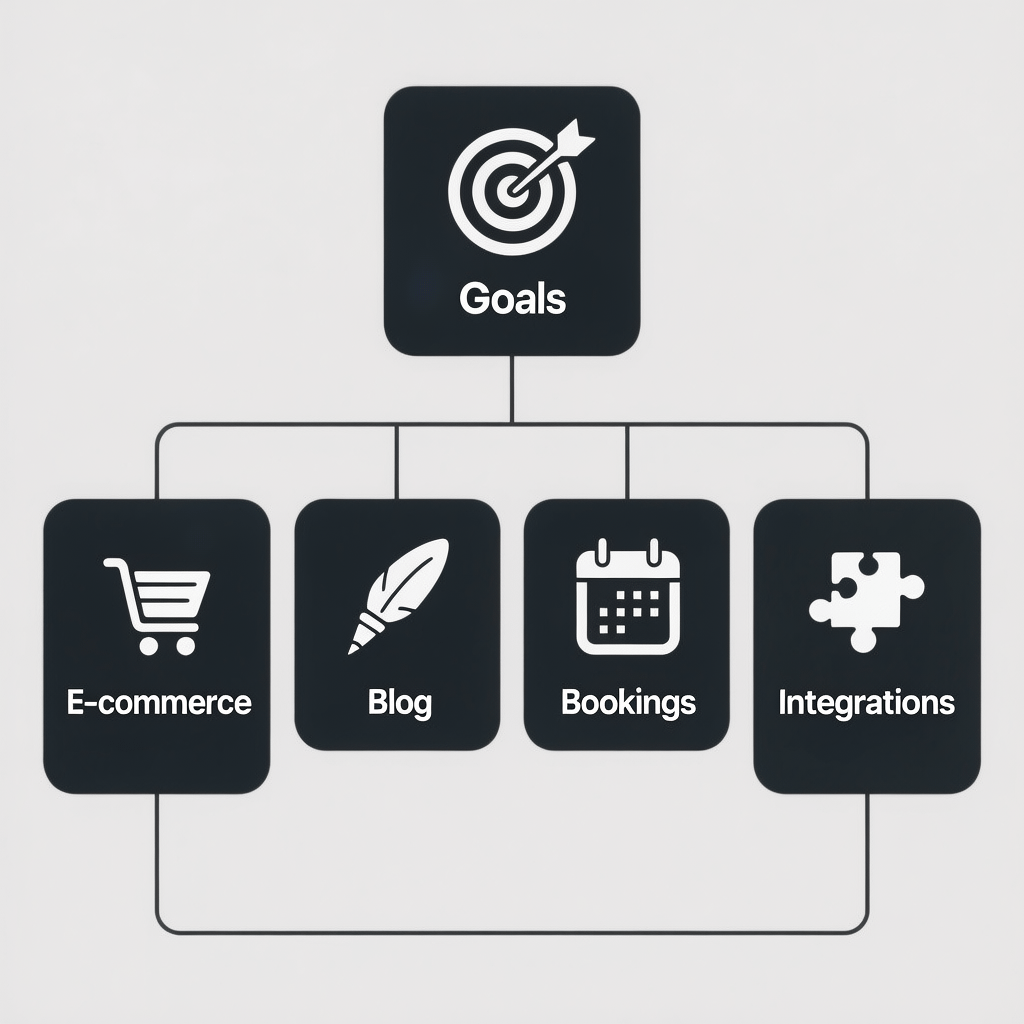
Write your must haves. Common ones include e commerce, blog, membership, booking, multilingual content, and integrations with email or CRM. This list narrows your website builder options instantly.
2) Decide on hosted vs self hosted
A hosted website builder bundles hosting, SSL, updates, and backups. You trade some flexibility for speed and simplicity.
A self hosted approach like WordPress with a page builder gives control over performance, code, and SEO. It asks more of your team today, but it can reduce long term platform lock in.
3) Map your content model
List the content types you will publish. Think products, case studies, services, and FAQs. A website builder with flexible collections will help you scale without messy workarounds.
Preview how taxonomies, tags, and filters work. If you rely on search and categorization, you need a website builder that handles this cleanly.
4) Test editor speed and usability
Open two candidates and time yourself building a simple home page in 30 minutes. A responsive editor matters as much as features. If the interface stutters, your team will avoid updates.
Check autosave, versioning, and preview accuracy. The best website builder makes publishing feel safe and fast.
5) Verify SEO controls and technical quality
Look for editable titles, meta descriptions, alt text, canonical tags, and open graph data. An ideal website builder lets you control structured data without hacks.
On performance, pick lightweight templates, compress images, use next gen formats like WebP, and enable caching. A website builder that outputs lean HTML and uses a CDN gives you a strong start.
6) Calculate total cost of ownership
Plan fees are only part of the picture. Add domains, apps, premium templates, email, and payment fees.
Estimate monthly maintenance time. A website builder that saves two hours a week might be cheaper than a lower priced plan that slows your team down.
7) Pilot, gather feedback, then commit
Build a one page pilot. Share it with customers and teammates. Note friction, requests, and performance.
When the website builder passes your pilot with minimal compromises, upgrade the plan, set your domain, and publish with confidence.
17 platforms compared: find your fit
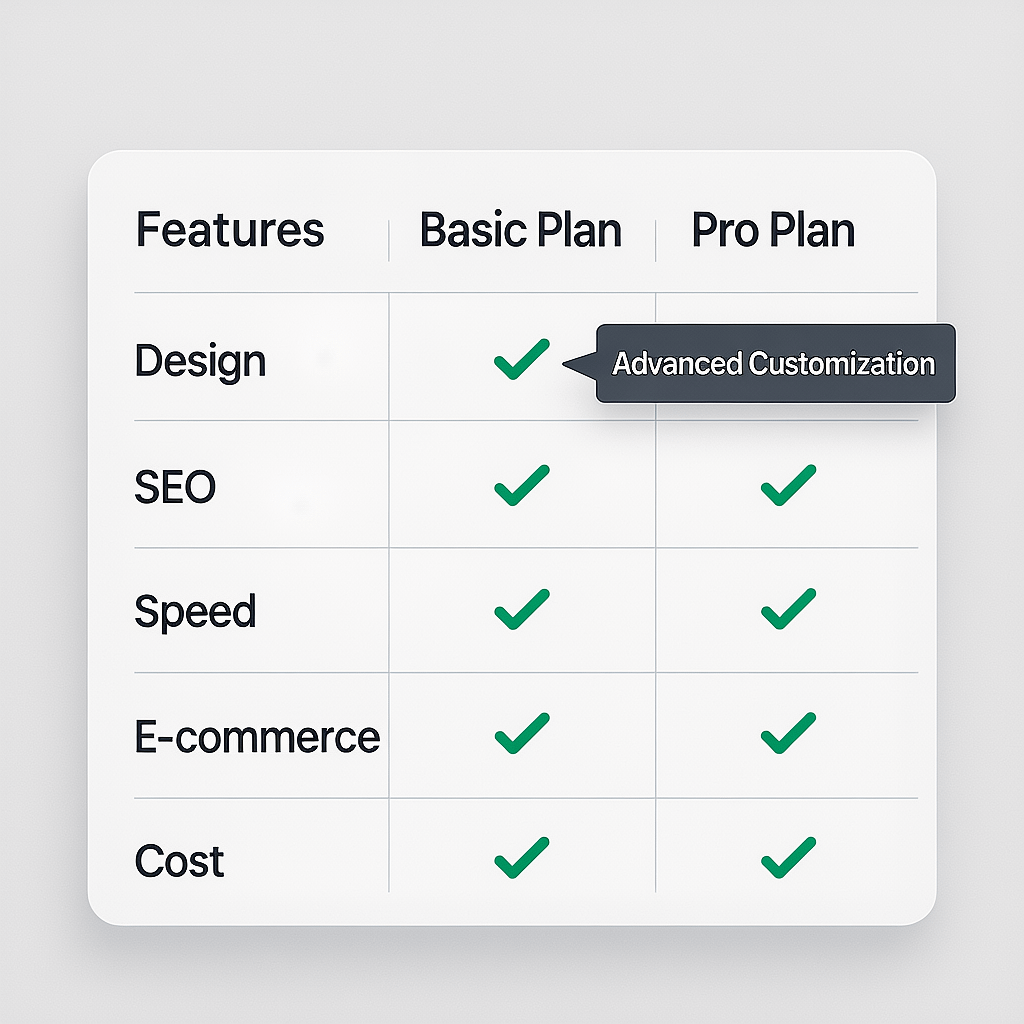
Here is a focused look at strengths, limits, best use cases, and pricing signals for the top platforms. Each website builder shines in specific scenarios.
1) Wix
Wix is a popular website builder known for speed to launch and a deep template library. The drag and drop editor is friendly for beginners, and the app market fills many gaps.
Best for small businesses that want an attractive site quickly. Watch for app stacking costs and keep designs lean to avoid bloat.
2) Squarespace
Squarespace is a polished website builder with elegant templates and intuitive content editing. Blogging, galleries, and simple stores are built in.
Best for brands prioritizing design and simple content workflows. Power users may find code access limited for advanced tweaks.
3) WordPress.com
WordPress.com blends a managed platform with the power of WordPress. You get a user friendly website builder experience with fewer maintenance tasks.
Best for content driven sites that want WordPress features with hosted convenience. Check plugin availability per plan before you commit.
4) WordPress.org plus a page builder
Self hosted WordPress with a visual editor like Gutenberg, Elementor, or Divi offers near total control. You craft a website builder like experience with full ownership of code and content.
Best for long term flexibility, advanced SEO, and custom features. It requires responsible hosting, updates, and security hygiene.
5) Shopify
Shopify is an e commerce first website builder that streamlines catalogs, payments, and checkout. It scales well and integrates with marketplaces.
Best for product centric brands. Transaction fees and app costs deserve careful review as you grow.
6) Webflow
Webflow is a visual development platform and website builder that outputs clean HTML and CSS. It rewards designers and marketers who value precision.
Best for custom layouts, CMS driven content, and performance. The learning curve is steeper than simple drag and drop tools.
7) Weebly
Weebly is a straightforward website builder geared toward simple sites and small stores. The editor is clean, and setup is fast.
Best for budget friendly projects with basic needs. Complex customizations can be challenging.
8) GoDaddy Website Builder
GoDaddy offers a guided website builder with simple sections and built in marketing extras. It emphasizes speed and bundled services.
Best for quick brochure sites and simple commerce. Templates are efficient but less flexible for unique layouts.
9) BigCommerce
BigCommerce is a robust e commerce platform with strong catalog tools and multi channel selling. It provides a website builder experience focused on scale.
Best for mid market and growing stores that need advanced features without heavy customization work.
10) Square Online
Square Online connects your store and POS with a tidy website builder for simple selling. Setup is quick, especially if you already use Square.
Best for cafes, service providers, and small retailers who want seamless online and in person sales.
11) Duda
Duda is an agency friendly website builder with client management, reusable sections, and white labeling. It balances speed and structure.
Best for teams managing many sites with repeatable components and brand control.
12) Framer
Framer blends design and publishing with a modern editor and crisp templates. It is a nimble website builder for product teams.
Best for startups and landing pages where iteration speed and visual polish matter most.
13) Carrd
Carrd is a minimalist website builder for one page sites and quick campaigns. It is very fast to set up and easy to maintain.
Best for simple personal pages, MVPs, and validation landing pages with forms.
14) Ghost
Ghost is a publishing focused CMS with a streamlined editor and membership options. It behaves like a specialized website builder for blogs and newsletters.
Best for creators who value writing speed, clean themes, and paid content.
15) HubSpot CMS
HubSpot CMS integrates with CRM and automation, offering a marketing centric website builder. Personalization and smart content are native.
Best for teams that want content and CRM living together with clear attribution and reporting.
16) IONOS MyWebsite
IONOS provides a simple website builder paired with affordable hosting. Templates and guided wizards help non technical teams launch.
Best for budget friendly sites that need basic features and local support options.
17) Hostinger Website Builder
Hostinger blends low cost hosting with a lightweight website builder. It is easy to use and includes AI helpers to speed setup.
Best for simple sites and starter stores where value and speed are the priority.
Speed, SEO, and accessibility that win on mobile
Even the best website builder falls short if pages feel slow. Users expect snappy loads and clear content structure.
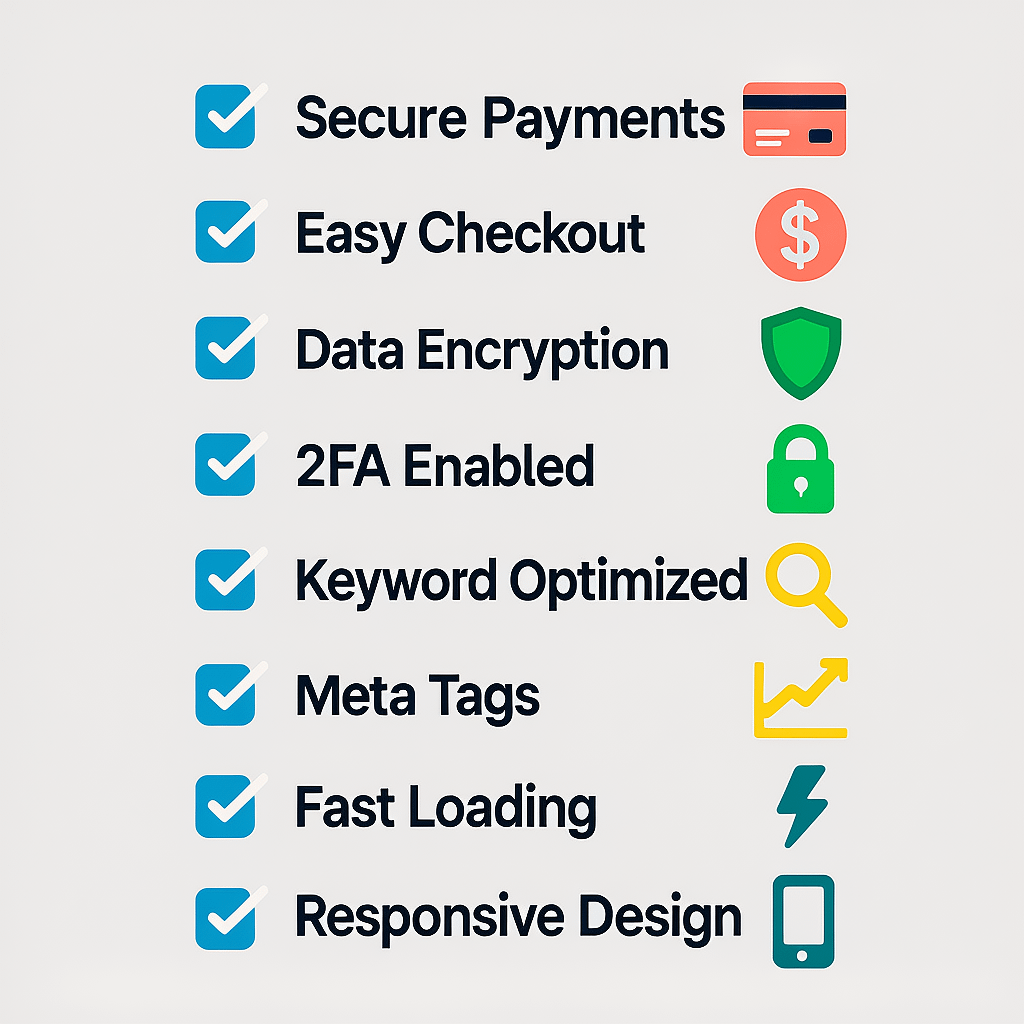
- Use lightweight templates and limit heavy scripts. Excess effects slow first paint.
- Compress images and serve WebP where possible. Aim for under 150 KB per hero image.
- Enable caching and a CDN. Many website builder platforms include global delivery.
- Structure content with h1 to h3, descriptive alt text, and logical headings.
- Add descriptive link text and form labels to support accessibility.
If you want deeper SEO strategy and technical execution, our SEO services can uncover quick wins and long term growth signals for your stack.

Design systems and content workflows
Templates get you live fast, but reusable sections let your team scale. Pick a website builder that supports global styles, components, and content collections.
Set a style guide for typography, colors, and spacing. Document patterns for hero banners, feature rows, and testimonials. A consistent system means less rework and fewer bugs.
Finally, streamline publishing. Build content briefs, define approvals, and create a release checklist. A website builder is most valuable when teams update content without waiting on developers.
Pricing and TCO: look beyond the sticker
Plan price is the start. Total cost includes add ons, time, and opportunity costs. A website builder that saves internal hours can be the cheapest option in practice.
- Platform plan tier and annual billing discounts
- Apps and integrations needed to meet your must haves
- Payment and transaction fees for commerce
- Domain, email, and security add ons
- Ongoing maintenance time and support coverage
Want a clear path from strategy to launch without surprise bills? Explore transparent website packages that align features and outcomes.
Security, backups, and compliance
Choose a website builder with automatic SSL, role based access, and built in backups. Confirm data location and privacy controls if you operate in regulated markets.
For forms and checkout, reduce fields, keep scripts lean, and stick to trusted payment providers. Update integrations and rotate API keys as a routine.
Accessibility is also non negotiable. Clear contrast, keyboard navigation, and ARIA landmarks help every visitor succeed.
Migration paths and when to outgrow a website builder
As your site evolves, you may need features outside your current platform. Plan for migration even if you are happy today.
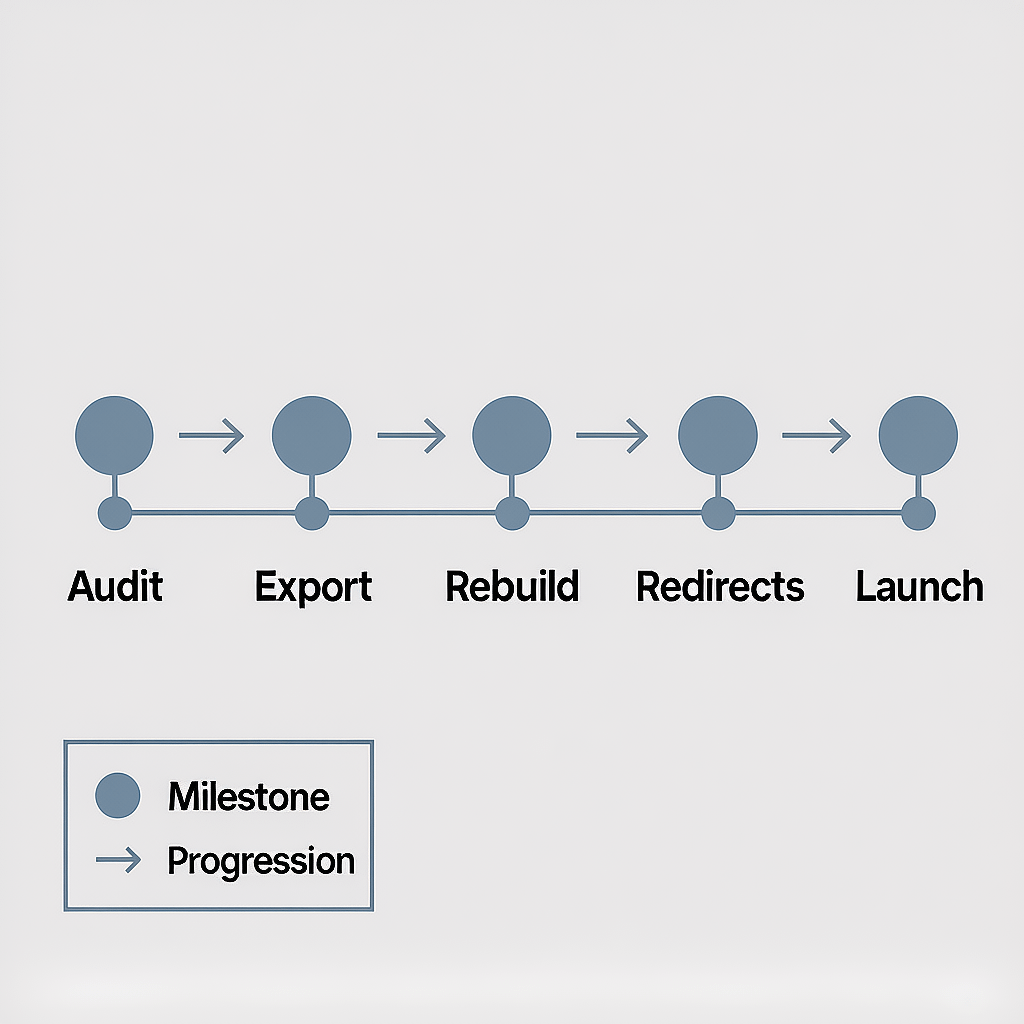
- Audit URLs, content types, and media.
- Export what you can and map the rest.
- Rebuild key layouts, then import content.
- Set redirects, test SEO, and validate forms.
- Launch during a low traffic window and watch analytics.
If now is the time to step up from a website builder to a custom WordPress build, our website design and development services give you flexibility without sacrificing speed.
Common mistakes to avoid with any website builder
- Picking on price alone instead of goals and content model
- Overusing animations that slow the page and hurt conversions
- Skipping image compression and caching configurations
- Ignoring accessibility and mobile testing
- Not documenting a style system or component library
- Rushing live without redirects or analytics set correctly
A thoughtful setup turns any website builder into a reliable asset. A rushed build turns even the best platform into a bottleneck.
FAQs
What is a website builder and how does it work?
A website builder is a visual editor that lets you assemble pages without code. You choose a theme, drag content blocks, edit copy, and publish to a hosted environment with SSL and updates handled for you.
Which website builder is best for small business?
For most small teams, Wix and Squarespace offer fast launch and solid features. If you need more control or advanced SEO, WordPress with a visual editor provides room to grow.
How much does a website builder cost per month?
Expect 5 to 40 USD for general sites and 29 to 299 USD for e commerce. Include domain, email, apps, and transaction fees to see your true monthly cost.
Can I move from one website builder to WordPress?
Yes. Export content, rebuild design in WordPress, and set 301 redirects. Test key flows, verify analytics, and switch DNS during a quiet period.
Is a website builder good for SEO?
Most platforms support core SEO controls. For advanced schema, performance tuning, and custom routing, WordPress offers deeper control when configured professionally.
Do I own my content on a website builder?
You own your text and media. Templates and platform features remain the provider’s IP. Check export options and keep your own backups of assets and copy.
Which website builder is fastest?
With a clean template and compressed images, many platforms can be fast. Webflow and optimized WordPress are often top performers when tuned correctly.
Bring it all together
You now have the process and data to pick a website builder with confidence. Start with goals, validate with a pilot, and keep speed and SEO front of mind.
Need expert help to design, build, and maintain a site that grows with you? Brand Nexus Studios partners with teams to plan strategy, ship fast, and keep performance high over time.
References

About the Author





It’s really a great and useful piece of information. I am happy that you simply shared this
useful information with us. Please keep us up to date like this.
Thank you for sharing.
Also visit my blog post … buy xanax without prescrition
What’s up, I wish for to subscribe for this web site to take hottest updates, so where can i do it please
assist.
Stop by my webpage: buy xanax without prescrition
We’re a group of volunteers and opening a brand new scheme in our community.
Your website provided us with useful information to work on. You’ve done an impressive process and our entire neighborhood can be thankful to you.
Feel free to surf to my website … DOWNLOAD WINDOWS 11 CRACKED
Nieuwste porno platforms bieden geavanceerde inhoud voor volwassenen. Kies voor
gegarandeerde platforms voor veilig kijken.
Feel free to surf to my page; BUY VIAGRA
Top adult platforms provide premium content for mature audiences.
Explore reliable adult sites for quality and privacy.
Also visit my web site – BUY LEVITRA ONLINE
Thanks for sharing your thoughts about security scaling tools.
Regards
Look at my page :: buy xanax without prescrition
Porno web bieden een verscheidenheid aan video’s voor volwassen entertainment.
Kies voor gegarandeerde platforms voor een veilige ervaring.
Feel free to visit my web site … BEST FREE PORN VIDEOS
Top adult websites offer high-quality content for adult entertainment.
Choose secure sites for a safe and enjoyable experience.
Also visit my blog post – LESBIAN PORN VIDEOS
Porno web bieden een verscheidenheid aan video’s voor volwassen entertainment.
Kies voor betrouwbare webbronnen voor een veilige ervaring.
Feel free to visit my web blog :: BUY CONCERTA ONLINE
It is generally not recommended to take ephedrine and
Viagra together without consulting a healthcare professional.
using Viagra in regural base is not good.
Sex is widely available on dedicated platforms for mature audiences.
Opt for reliable sources to ensure safety.
My blog post – blowjob videos
Porno is beschikbaar op verschillende adult websites voor vermaak.
Kies altijd voor veilige platforms.
Have a look at my blog post BLOWJOB VIDEOS
Expliciete inhoud sites bieden een verscheidenheid aan video’s voor volwassen entertainment.
Kies voor veilige pornosites voor een veilige ervaring.
Feel free to surf to my site :: buy cannabis online
Adult themes is widely available on dedicated platforms for
mature audiences. Opt for trusted adult hubs to ensure safety.
Feel free to visit my website :: buy cannabis online
Volwassen entertainment is toegankelijk via veilige en betrouwbare websites.
Ontdek betrouwbare platforms voor kwaliteitsinhoud.
My blog … blowjob videos
Volwassen inhoud vinden door betrouwbare adult platforms buy cannabis online te
verkennen. Ontdek veilige sites voor een private ervaring.
Porno kijken op een veilige manier door te kiezen voor geverifieerde adult websites.
Kies voor gegarandeerde bronnen voor discreet vermaak.
my website; lesbian porn videos